How to Make a SaaS Promo Video in Minutes
Make a SaaS promo video from your landing page: the promise, product, proof, CTA structure, screenshots that work, and where to use it.
· 6 min read
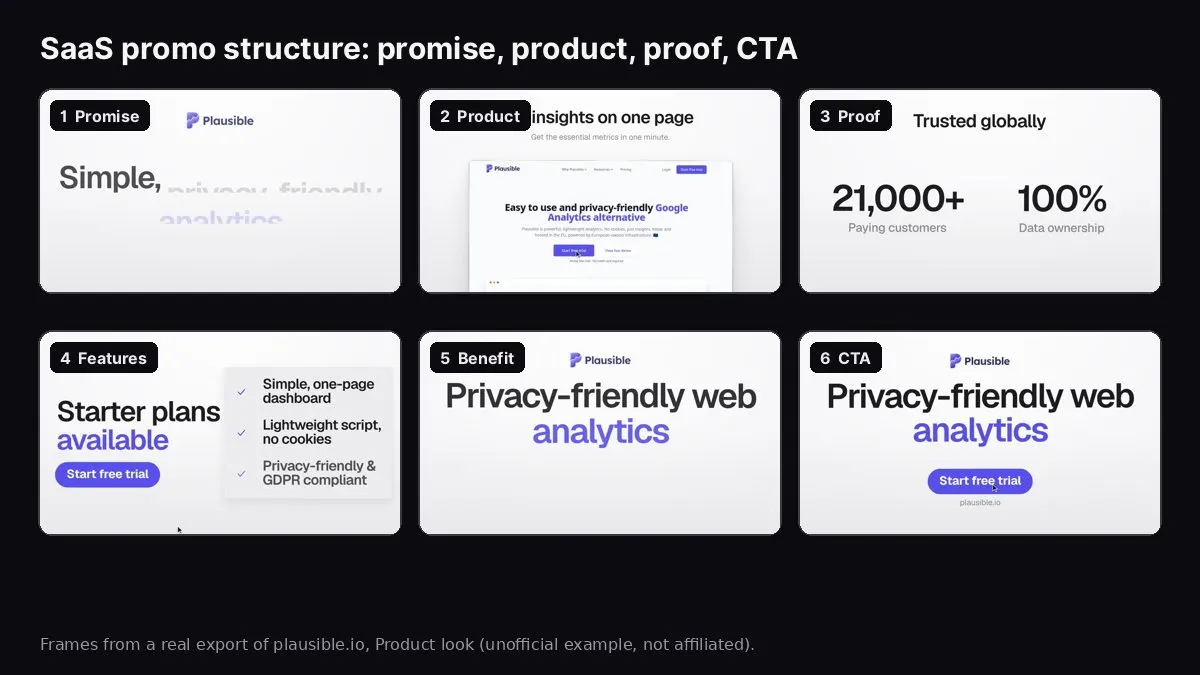
Frames from a real export of plausible.io made with Website to Promo Video. Unofficial example, not affiliated with Plausible.
A good SaaS promo video is 15 to 30 seconds long, shows your real product UI early, makes one promise, backs it with two or three features and one true proof point, and ends on a single call to action. The fastest way to make one is to start from your landing page, which already has the headline, features and screenshots, and turn it into scenes rather than writing a video from scratch.
The image above shows the six scenes of a real 15-second promo made from plausible.io's public homepage with our Website to Promo Video tool, using the Product look. It's an unofficial example to show the output; Plausible had no part in it. The promise ("Simple, privacy-friendly analytics"), the screenshot, the "21,000+ paying customers" proof, the feature list and the "Start free trial" button all came straight from their page.
This guide covers what to put in a SaaS promo, how it differs from a demo or explainer, how to build one from your landing page, and how to get it watched.
Promo vs demo vs explainer: which one you need
SaaS teams use three kinds of short product video, and mixing them up is the most common reason a video doesn't work:
- Promo video (15–30s): gets attention. One promise, the product on screen, a reason to believe, a call to action. Used on landing pages, launches, social posts and ads. Usually music and on-screen text, no narration.
- Explainer video (60–120s): explains a problem and how the product solves it, often with a voiceover and illustrations. Used on pricing pages, sales emails and for complex B2B products.
- Demo video (2–10 min): shows the real workflow, click by click. Used for onboarding, sales calls and help docs. Usually a screen recording.
If you're launching, posting on social, or need a hero for your homepage, you want a promo. If people ask "but how does it actually work?", that's when you need a demo. Most products eventually want both.
What to put in a SaaS promo
1. One promise
Finish this sentence: "[Product] helps [who] [do what]." That becomes the opening line. Keep it under eight words on screen. Good promises are concrete: "Simple, privacy-friendly analytics." "Automate AI workflows and agents." Weak ones are abstract: "The future of work."
2. The product, early
Show a real screen within the first few seconds, in a browser or laptop frame. Use a screen with real-looking data, not an empty state or a login page. For SaaS, the dashboard or the main working view usually tells the story best.
3. Two or three features
Pick the features a new user notices in their first session, not your whole feature list. Each gets a short title and one benefit line: "Lightweight script, no cookies."
4. One proof point
A true, public number or short quote: customers, ratings, uptime, "used by" logos you have permission to show. If you don't have proof yet, skip the scene. Never invent it.
5. One call to action
The same action as your landing page: "Start free trial", "Book a demo", "Try it free". Show your URL in the last scene.
How to build it from your landing page
- Pick the right page. Your homepage if it sells one product; otherwise the specific product or feature page.
- Paste it into Website to Promo Video. It reads the copy, colours, fonts, logo and images, and captures live screenshots of the site when it can. Reading the site is free.
- Tighten the brief. The tool writes a brief from your page: headline, subheadline, features, proof and call to action. Cut each line to the shortest true version. Remove features that need a paragraph to explain.
- Add app screenshots. Marketing pages often show illustrations rather than the product. If your best screens are inside the app, upload three to five screenshots.
- Pick a look. Product keeps your UI front and centre on a quiet neutral stage, the safest choice for B2B. Editorial uses serif headlines on light paper. Swiss uses huge type on a flat field of your brand colour. Auto lets the AI choose per brand.
- Pick shape, length and music. 16:9 and 15 seconds for a landing page; 30 seconds if you need three feature scenes. Corporate, ambient tech or lo-fi music suits most B2B products.
- Generate, check and export. Read every line at full speed, check the screenshots aren't covered by text, describe any fixes in plain words, and export the MP4 in your browser.
B2B tone: what to avoid
- Hype words. "Revolutionary", "game-changing", "10x". B2B buyers skip past them. Say what the product does.
- Stock people. A smiling actor at a laptop says nothing about your software. Show the software.
- Every feature at once. Three features well beats ten features too fast to read.
- Tiny UI. A full-page screenshot shrunk into a 16:9 frame is unreadable. Upload a cropped screenshot of the part that matters instead.
- Claims you can't back up. If legal or your customers would wince at a line, cut it.
Where to use a SaaS promo
- Homepage hero: muted and looping next to your headline. Our guide on adding a video to your landing page has the HTML and a file-size checklist.
- Launches: Product Hunt, Hacker News "Show HN" posts with a link, Indie Hackers. See the Product Hunt launch video guide.
- LinkedIn and X: upload the video natively instead of linking to YouTube. Native video plays right in the feed, so people see it without clicking away. Use 1:1 or 16:9 on LinkedIn, 16:9 on X.
- Paid ads: a 15-second 9:16 cut for Reels and Shorts placements, a 1:1 cut for feeds. See video aspect ratios for social media.
- Sales emails: a thumbnail image that links to the video. Most email clients don't play video inline.
- Changelog and release posts: a short cut for each big feature. See how to make a feature announcement video.
Website to Promo Video
Paste your site → a branded 15–30s promo with your screenshots, brand and AI music. MP4 in your browser.
How to tell if it's working
A promo's job is to make people take the next step. Measure that, not just views:
- On your landing page: compare sign-up or demo-request rate with and without the video (an A/B test, or a before/after over two similar weeks).
- On social: watch-through rate to the last scene, and clicks to your site.
- On launches: gallery views vs visits from that launch.
If people drop off in the first three seconds, the hook is weak or the product appears too late. If they watch but don't click, the call to action or the offer is unclear.
FAQ
How long should a SaaS promo video be? 15 to 30 seconds for landing pages, launches and social. Go longer only for an explainer or demo.
Should a SaaS promo have a voiceover? Not necessarily. Feeds autoplay muted, so on-screen text has to work alone. Music helps the viewers who unmute. Website to Promo Video makes music-driven videos without narration.
Can I make one without a designer or editor? Yes. With a website-to-video tool you edit a short text brief and pick options; the tool handles layout, animation, timing and the music cut.
What does it cost with Website to Promo Video? Reading your site and editing the brief are free. A promo uses credits from a pack (packs from $5, credits never expire), and failed runs are never charged. See the tool FAQ.
Which other tools do this? We compare several in website-to-video tools for SaaS launches.