How to Make a Product Hunt Launch Video
Make a short Product Hunt launch video from your website: what Product Hunt accepts, a 15-second launch scene plan, and a launch-day checklist.
· 6 min read
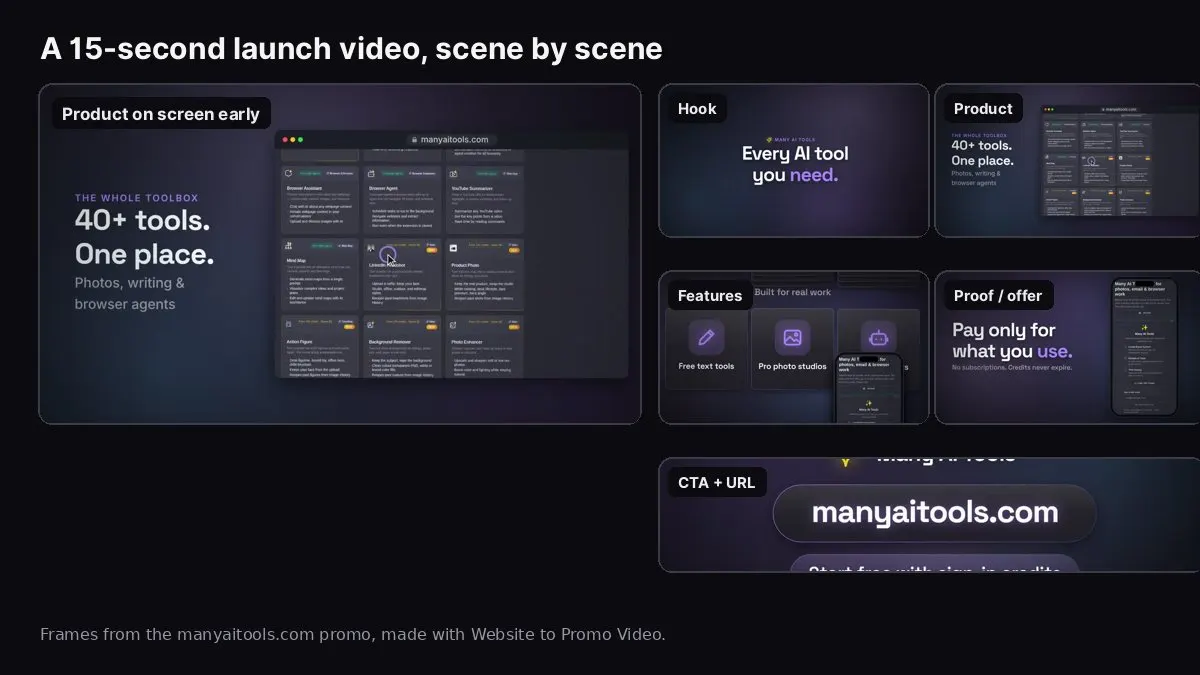
Frames from our own manyaitools.com promo, made with Website to Promo Video.
To make a Product Hunt launch video, keep it short (15 to 45 seconds), show the product within the first few seconds, make every scene readable with the sound off, and end on one clear call to action. Export it in 16:9, upload it to YouTube at least a day before launch (public or unlisted, embedding allowed), and paste the full YouTube URL into your Product Hunt gallery. Product Hunt doesn't host video files itself.
The image above shows the scenes of a real 15-second launch video made from manyaitools.com with our Website to Promo Video tool: a one-line promise, the product in a browser frame, two feature cards, the offer, and the URL as the last scene. This guide covers what Product Hunt actually accepts, a scene-by-scene structure, how to make the video from your landing page, and a launch-day checklist.
Do you need a video for Product Hunt?
No. A video is optional on a Product Hunt post. The basics matter more: a clear name and tagline, a thumbnail, at least two gallery images, a short description and a first comment. A video is worth making when your product is easier to understand in motion than in still screenshots, for example an editor, an automation tool, a browser extension or anything with a "watch this happen" moment.
A short video also pays off after launch day. The same file works as your landing page hero, your launch post on X and LinkedIn, and (in 9:16) a Reel or Short. That's why it makes sense to build it from your real site rather than as a one-off.
What Product Hunt accepts (check before you export)
From Product Hunt's own help pages at the time of writing:
- Video: YouTube links only. Use the full URL, because shortened youtu.be-style links may not load. The video must not be private.
- Timing: newly uploaded YouTube videos can take around 12 hours before Product Hunt can embed them. Upload the day before, not the morning of launch.
- Embedding: the YouTube video must allow embedding, or it won't appear in your gallery.
- Gallery images: 1270 × 760 is the recommended size, and the gallery needs two or more images before it shows.
- Thumbnail: square, 240 × 240 recommended. A GIF thumbnail must be under 3 MB and only animates on hover.
- Launch time: posts go live at 12:01 AM Pacific time.
Product Hunt also supports interactive demos (from tools like Arcade or Supademo) as a gallery item. That's a different format: a clickable walkthrough rather than a video.
The right length and shape
- Length: 15 to 45 seconds. Visitors scroll your gallery quickly. A 15-second promo gets the idea across; 30 seconds gives you room for three features. Save the two-minute walkthrough for your website or a follow-up comment.
- Shape: 16:9 landscape, 1920 × 1080. The gallery is landscape, and so is YouTube's default player.
- Sound: optional. Assume most people watch muted. Music helps the people who unmute; on-screen text has to carry the message for everyone else.
A scene-by-scene structure
This structure fits most software, app and SaaS launches. Times are for a 15-second video; stretch each scene for 30.
- Hook (0–3s): the one-line promise. "Every AI tool you need." "Plan your week in two minutes." Not your company name, not "Introducing…".
- Product (3–7s): your main screen in a browser or phone frame. This is the most important scene. If a visitor sees nothing else, they should see the product.
- Features (7–10s): two or three short feature cards, one benefit each.
- Proof or offer (10–13s): a true number, a short quote, or the launch offer ("Pay only for what you use", "50% off for Product Hunt").
- Call to action (13–15s): your URL and one action, like "Try it free".
If you're not sure what to write in each scene, our promo video script guide has 15 and 30 second templates you can fill in.
How to make it from your landing page
If your landing page already says what the product does, you don't need to start from a blank timeline.
- Paste your landing page into Website to Promo Video. It reads the headline, features, proof, call to action, colours, fonts, logo and images, and takes live screenshots of the site when it can. Reading the site is free.
- Edit the brief. Rewrite the headline as your launch tagline. Keep three features. Add the launch offer as the proof line if you have one. Set the call to action to what Product Hunt visitors should do.
- Add product screenshots if your best screens are behind a login. Upload three to five shots with realistic data.
- Choose 16:9 and 15 or 30 seconds. Pick a look (or leave it on Auto) and a music genre.
- Generate, preview with sound, and fix. Describe any spot that looks wrong ("the feature text at 8s is too small") and apply a change.
- Export the MP4 in your browser, then re-lay it out for 9:16 for Reels, Shorts and TikTok, and 1:1 for feeds, without starting over.
Website to Promo Video
Paste your site → a branded 15–30s promo with your screenshots, brand and AI music. MP4 in your browser.
Upload it to YouTube the right way
- Upload the MP4 to YouTube at least 12 hours before launch.
- Set visibility to Public or Unlisted. Not Private, and not Scheduled for after your launch.
- Make sure Allow embedding is on (in the video's advanced settings).
- Give it a plain title like "[Product] – [tagline]" and put your URL in the first line of the description.
- Choose a thumbnail frame that shows the product, not a title card.
- Copy the full URL (youtube.com/watch?v=…) and paste it into the gallery field of your Product Hunt draft.
- Open the draft preview and confirm the video plays.
Common mistakes
- A long logo intro. Five seconds of an animated logo is five seconds of nothing. Put the logo in the last scene.
- Text that's too small or too fast. Watch it on your phone. If you can't read a line before it disappears, cut words.
- Fake proof. Don't show invented user counts, ratings or testimonials. Product Hunt's community is quick to notice, and it's a bad first impression. Skip the proof scene if you don't have one yet.
- Asking for upvotes in the video. Product Hunt discourages asking for upvotes. Ask people to try the product and leave feedback instead.
- Uploading on launch morning. The video may not embed yet.
- A video that only works with sound. Many people will never unmute it.
Launch-day checklist for the video
- 16:9 MP4, 15–45 seconds, product visible in the first few seconds
- Readable on a phone with the sound off
- Uploaded to YouTube a day early, public or unlisted, embedding on
- Full YouTube URL pasted into the gallery and tested in the preview
- 9:16 and 1:1 versions ready for your X, LinkedIn and Reels posts
- The same 16:9 file looping muted in your landing page hero (see how to add a video to your landing page)
- A first comment that explains why you built it, and what feedback you want
FAQ
Can I upload an MP4 straight to Product Hunt? No. Product Hunt supports YouTube links for video. Upload your MP4 to YouTube first.
Should the video have a voiceover? It can, but it doesn't need one. Most gallery viewers watch muted, so on-screen text matters more. Website to Promo Video makes music-driven videos without narration.
What if I launch an app rather than a website? The same structure works. Use phone-frame screenshots of the app, and see our app promo video guide for the vertical version.
How much does it cost to make one with Website to Promo Video? Reading your site and editing the brief are free. Generating a video uses credits from a pack (packs start from $5 and never expire), and you're only charged when the video is ready. Details are in the tool FAQ.