How to Write a Promo Video Script (15 & 30 Second Templates)
Write a short promo video script that works muted: word budgets for 15 and 30 seconds, fill-in templates, and examples for SaaS and apps.
· 6 min read
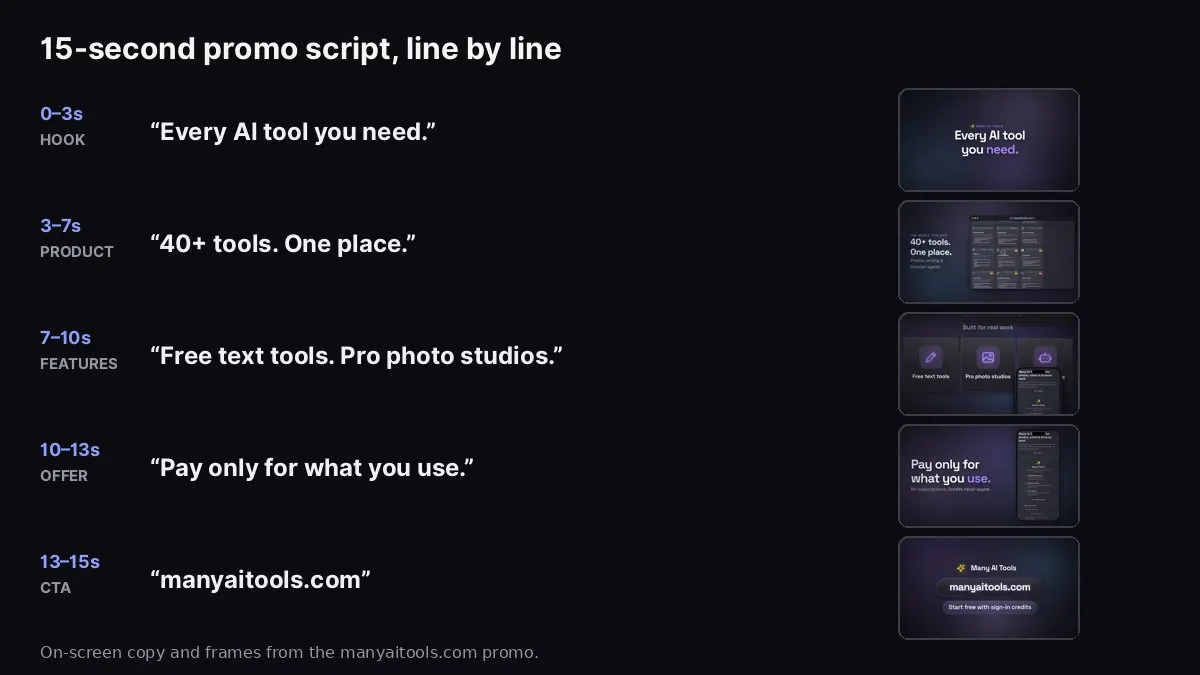
Script lines next to frames from our own manyaitools.com promo, made with Website to Promo Video.
A promo video script is a list of scenes, each with a time slot and a few words of on-screen text: a hook, the product, two or three features, one proof point or offer, and a call to action. For a 15-second promo, that's five scenes and roughly 30 to 50 words in total, most of them in short labels. For 30 seconds, it's seven or eight scenes and about 60 to 90 words. Write it so it works with the sound off, then add music.
The image above shows the actual on-screen script of a 15-second promo of manyaitools.com, made with our Website to Promo Video tool, with the frame each line appears on. The whole video uses about 45 words, and no single line is longer than six.
This guide gives you a fill-in-the-blanks template for 15 and 30 seconds, worked examples for three kinds of product, rules for writing lines people can actually read, and how to turn the script into a finished video.
Why promo scripts are so short
People read moving text much slower than a page. On a scene that lasts two or three seconds, a viewer can comfortably read about five to eight words, and only if the line is simple. Most short promos also play muted in a feed, so there's no narrator to help.
That changes how you write:
- Each scene says one thing. Not "Fast, secure and easy to use" but "Set up in 2 minutes."
- Nouns and verbs, not adjectives. "Track every invoice" beats "Powerful, intuitive invoicing."
- The product does the talking. A screenshot on screen can replace a sentence of explanation.
The 15-second promo script template
Copy this, then fill in the brackets.
- Hook (0–3s): [What the product does, in 3–6 words.] Example: "Every AI tool you need."
- Product (3–7s): [Short label] + your main screen in a browser or phone frame. Example: "40+ tools. One place." over the homepage.
- Features (7–10s): [Feature 1, 2–4 words] · [Feature 2, 2–4 words] Example: "Free text tools" · "Pro photo studios"
- Proof or offer (10–13s): [A true number, short quote, or offer.] Example: "Pay only for what you use. No subscriptions."
- Call to action (13–15s): [Action] + [yourdomain.com] Example: "manyaitools.com · Start free with sign-in credits"
Word budget: roughly 30–50 words of on-screen text in total, with no line longer than about eight words.
The 30-second promo script template
- Hook (0–3s): [The promise, 3–6 words.]
- Problem (3–6s): [The pain, in the customer's words. 4–8 words.]
- Product reveal (6–11s): [Product name] + main screen.
- Feature 1 (11–15s): [Title] + [one benefit line, under 10 words] + screen.
- Feature 2 (15–19s): [Title] + [benefit] + screen.
- Feature 3 (19–23s): [Title] + [benefit] + screen.
- Proof (23–27s): [A true number, rating or short quote with name.]
- Call to action (27–30s): [Action] + [yourdomain.com]
Word budget: roughly 60–90 words of on-screen text.
Worked examples
A B2B SaaS tool
- Hook: "Invoices that chase themselves."
- Problem: "Late payments eat your week."
- Product: "Meet Ledgerly" + dashboard of open invoices.
- Feature: "Automatic reminders" / "Polite nudges at 3, 7 and 14 days."
- Feature: "One-click card payments" / "Clients pay from the email."
- Feature: "Cash-flow view" / "See next month's money today."
- Proof: (only if true) "Used by 2,000 small agencies."
- CTA: "Start free · ledgerly.com"
A consumer mobile app
- Hook: "Plan your week in 2 minutes."
- Product: Phone frame with the weekly planner.
- Features: "Drag tasks to days" · "Smart reminders"
- Offer: "Free on iOS and Android."
- CTA: "Get Weekly · link in bio"
A developer tool
- Hook: "Preview every pull request."
- Product: Browser frame showing a PR with a preview link.
- Features: "Deploys in seconds" · "Shareable URLs"
- Proof: "Open source · MIT licensed"
- CTA: "npm i previewly · previewly.dev"
(The product names in these three examples are made up.)
Rules for lines people can read
- Under 8 words per line. If a line needs more, split it across two scenes or cut it.
- One line per scene, two at most. A title and a short subline is the maximum.
- Use numbers you can prove. "2 minutes", "9,000+ apps", "4.8 on the App Store" — only if they're true and already public.
- Write like a headline, not a sentence. Drop "that", "which", "we're excited to".
- Repeat your landing page. The video should match your page's headline and call to action, so people who click recognise where they've landed.
- Read it out loud at speed. If you stumble, the viewer will too.
Turning the script into a video
You don't need to write the script from a blank page. If your landing page already has a headline, features and a call to action, start there:
- Paste your page into Website to Promo Video. It reads your copy and writes a brief with a headline, subheadline, features, proof and call to action. Reading a site is free.
- Edit the brief using the rules above. Cut each line to its shortest true version. The brief fields map almost one-to-one onto the template: headline → hook, features → feature scenes, proof → proof scene, CTA → last scene.
- Pick 15 or 30 seconds. The AI storyboards the scenes and times each one to the beat of the music.
- Preview and check readability. If a line disappears before you finish reading it, shorten it and apply the change.
Website to Promo Video
Paste your site → a branded 15–30s promo with your screenshots, brand and AI music. MP4 in your browser.
Common script mistakes
- Opening with the logo or "Introducing…". Open with the promise; the logo goes in the last scene.
- Too many features. Viewers remember two or three. List the rest on your site.
- Vague proof. "Loved by teams everywhere" says nothing. Use a real number or skip it.
- Two calls to action. "Sign up, follow us and join our Discord" means none of them happens. Pick one.
- A script that needs a voiceover. If the story only makes sense with narration, the text isn't doing its job for muted viewers.
Where to go next
- For launch-specific advice and Product Hunt's upload rules, see how to make a Product Hunt launch video.
- For software products, how to make a SaaS promo video goes deeper on promise, proof and B2B tone.
- For the music under your script, see how to choose music for a promo video.
FAQ
How many words should a 30-second promo script have? Roughly 60 to 90 words of on-screen text with no voiceover, spread over seven or eight scenes. With a voiceover, a narrator speaks roughly 2 to 2.5 words per second, so about 60 to 75 spoken words.
Should I write the script before designing the video? Yes, at least the headline, features, proof and CTA. With a website-to-video tool, editing the brief is writing the script.
Can AI write my promo script? It can draft one from your landing page, which is a good start. Always edit it: cut words, check every claim is true, and make sure it sounds like your brand.