How to Choose Music for a Promo Video
Pick promo video music that fits: genre by audience, tempo for short cuts, licensing rules for business use, cutting on the beat, and muted feeds.
· 6 min read
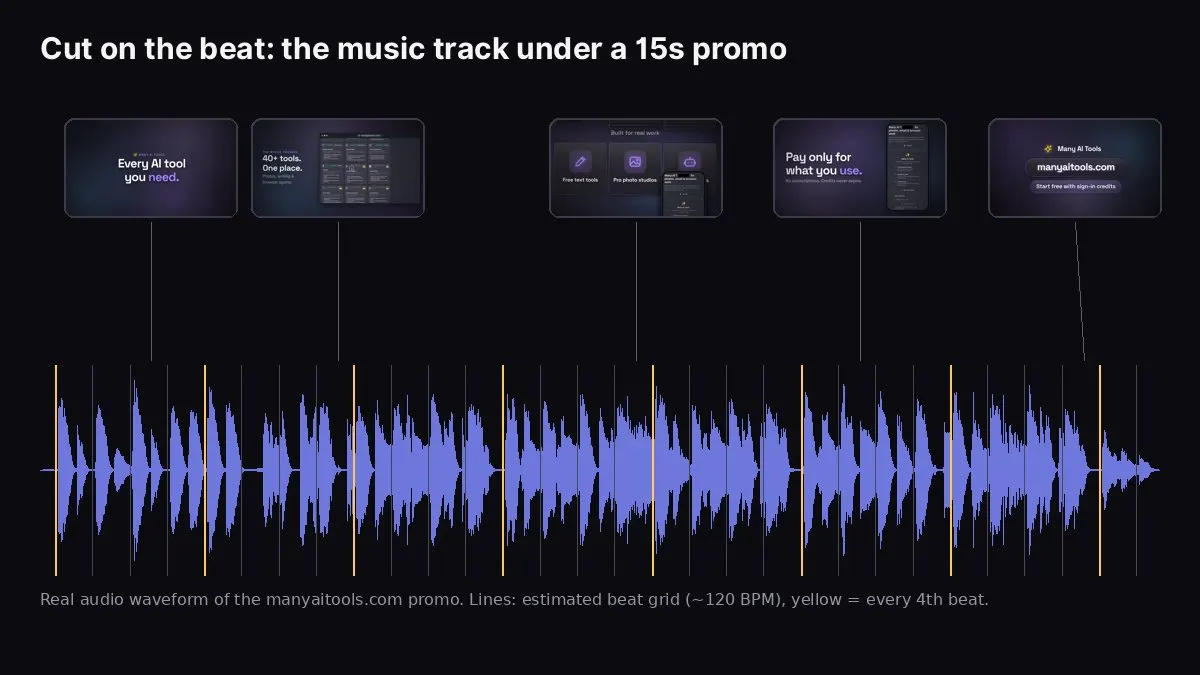
The real audio track of our manyaitools.com promo, with scene changes landing on the beat.
To choose music for a promo video, match the genre to your audience and brand (upbeat electronic for consumer apps, corporate or ambient for B2B, cinematic for a big launch), pick a tempo that fits your scene length (around 100–130 BPM suits most 15–30 second promos), make sure you have the rights to use the track commercially on every platform you'll post to, and cut your scenes on the beat. Then check the video still works muted, because most people will watch it without sound.
The image above is the real audio waveform of the 15-second manyaitools.com promo, made with our Website to Promo Video tool, with an estimated beat grid of about 120 beats per minute. The scene changes land on the beat, which is a big part of why a short promo feels "edited" rather than like a slideshow.
This guide covers picking a genre and tempo, the licensing rules that trip people up, how cutting on the beat works, and how to handle sound for muted feeds.
Step 1: Match the genre to the audience
Music sets the tone before anyone reads a word. A rough guide:
- Upbeat electronic pop: consumer apps, launches, anything that should feel fresh and energetic.
- Corporate tech (soft piano, synth pads, light percussion): B2B SaaS, finance, security, tools for teams. Confident without being loud.
- Lo-fi or chill house: productivity, writing, study and wellness apps. Calm and modern.
- Ambient tech: developer tools, AI products, infrastructure. Spacious and "precise".
- Cinematic build: big launches, "2.0" releases, funding announcements. Builds to a hit at the end.
- Synthwave: retro or creative tools, gaming-adjacent products.
- EDM or hype: high-energy consumer launches and short ads. Use carefully for B2B.
- Hip-hop beats: creator tools, lifestyle and social apps.
- Acoustic: small businesses, food, craft, community and "human" brands.
When in doubt, choose the calmer option. Loud, busy music fights with on-screen text.
Step 2: Pick a tempo that fits the cut
Tempo (beats per minute) decides how often you can change scenes without it feeling random:
- At 120 BPM, one beat is half a second and one bar (four beats) is two seconds. A 15-second promo is about seven and a half bars, so five scenes of two to three seconds each line up neatly with bar lines.
- At 90 BPM (lo-fi), a bar is about 2.7 seconds. Good for calmer videos with fewer, longer scenes.
- At 128–140 BPM (EDM, hype), bars go by fast. Good for quick cuts; hard for text-heavy scenes.
For most 15–30 second promos, 100–130 BPM is the comfortable range: fast enough to feel lively, slow enough to read the text.
Step 3: Get the rights right
This is where most mistakes happen. Using a popular song in a promo for your business almost always needs a licence you don't have, and platforms do detect it.
- Commercial songs: a promo is advertising. Using a chart song needs permission from the rights holders (often called a sync licence). Without it, expect muted audio, blocked videos, or copyright claims.
- Platform music libraries: Instagram, TikTok and YouTube Shorts let people add music in their apps, but business accounts often get a restricted, commercially cleared library. Check what your account type allows before relying on it.
- Royalty-free libraries: services like the YouTube Audio Library or paid stock music sites license tracks for commercial use. Read the licence: some need credit, some exclude ads, some are per platform.
- AI-generated music: check the terms of the tool that made it. Tracks may be non-exclusive (other people can use the same track) and some carry an inaudible watermark identifying them as AI-generated.
In Website to Promo Video, music comes from our library of instrumental tracks made with Google's Lyria model. The tracks are yours to use in your video, but they aren't exclusive to you and carry an inaudible SynthID watermark that identifies them as AI-generated. That's worth knowing if exclusivity matters for your brand, for example in a TV ad.
Step 4: Cut on the beat
"Cutting on the beat" means scene changes, text reveals and other big movements happen exactly on beats of the music, especially on the first beat of a bar.
- Scene changes on bar lines (every four beats) feel natural and calm.
- Text reveals or icon pops on single beats add energy within a scene.
- A "drop" or hit (a big moment in the track) is the place for your product reveal or the final call to action.
- The end of the track should land on the last scene, not fade out halfway through it.
Doing this by hand in an editor means marking beats on a timeline and nudging every cut. Website to Promo Video does it for you: it plans the storyboard with scenes timed to the track's beat grid (library tracks come with their beats already analysed) and trims the audio to the length of the video.
Step 5: Design for muted viewing
Feeds autoplay muted, so the music is a bonus for people who unmute, not the message:
- Every scene needs readable text that tells the story without sound.
- Avoid "wait for it" moments that only work with audio, like a joke that lands on a sound effect.
- Mix the music at a comfortable level. If people unmute in an office, a quieter mix is less likely to be muted again.
- If you add a voiceover, keep the music low under it and add captions.
Changing the music
Try two or three genres before you settle. The same video can feel completely different:
- Corporate music makes a dashboard feel trustworthy.
- Upbeat pop makes the same dashboard feel easy and fun.
- Cinematic makes it feel like a big moment.
In Website to Promo Video, you can leave music on Auto (the AI picks a genre that fits your site) or choose one yourself: upbeat, corporate, lo-fi, cinematic, synthwave, EDM, hype, ambient tech, hip-hop or acoustic, or no music. After generating you can request a new track, and the video is re-timed to it.
Website to Promo Video
Paste your site → a branded 15–30s promo with your screenshots, brand and AI music. MP4 in your browser.
Checklist
- Genre matches the audience and brand
- Tempo between roughly 100 and 130 BPM for a 15–30 second promo
- Licence covers commercial use on every platform you'll post to
- Scene changes land on beats, big moments on the strongest beat
- Track ends with the video, not mid-fade
- Video still makes sense with the sound off
FAQ
Can I use a popular song in my promo video? Not without a licence from the rights holders. For a business promo, use licensed royalty-free or AI-generated music with clear terms.
Is AI-generated music safe to use commercially? It depends on the tool's terms. Check whether you can use it commercially, whether it's exclusive, and whether it's watermarked. Website to Promo Video's tracks can be used in your video, aren't exclusive, and carry an inaudible SynthID watermark.
What BPM is best for a promo video? Around 100–130 BPM for most 15–30 second promos. Slower for calm brands, faster for high-energy launches.
Should my promo video have music at all? Usually yes, for the people who unmute. But make sure the video works without it. For more on structure, see how to write a promo video script and how to make a SaaS promo video.