Best Website to Video Tools Compared (2026)
An honest comparison of website and URL to video tools: Website to Promo Video, ShipTeaser, LaunchReel, Rendrio, Motionflare, Pictory and Creatify.
· 6 min read
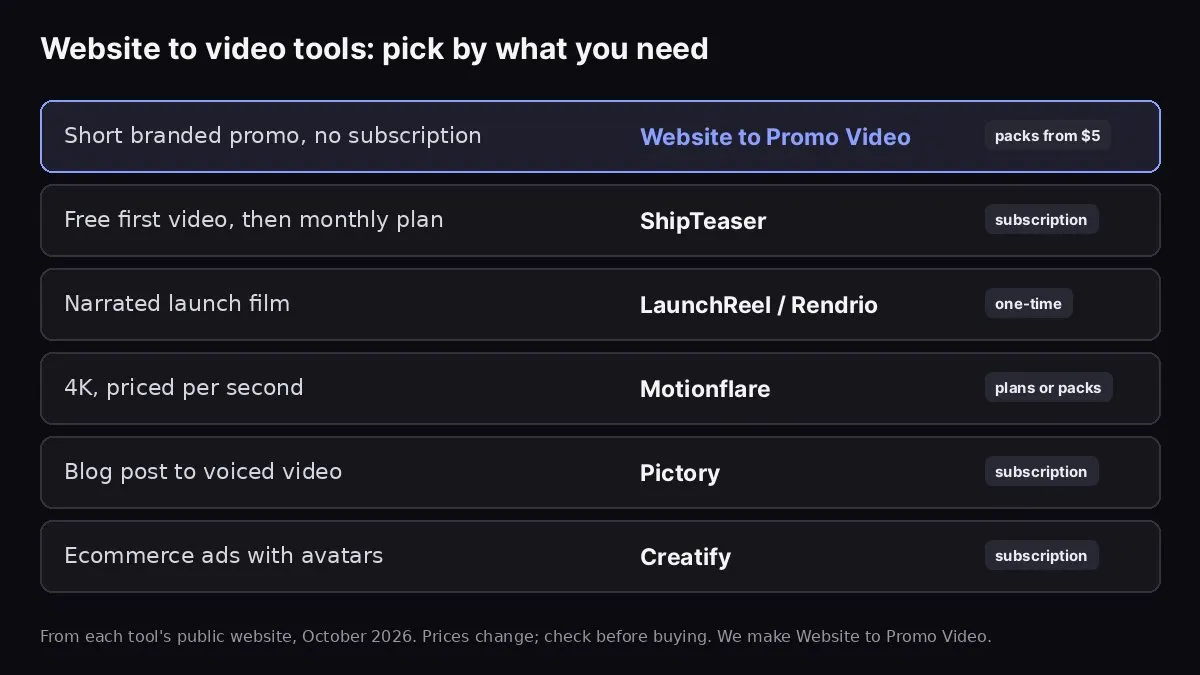
From each tool's public website, October 2026. We make Website to Promo Video.
The best website to video tool depends on what you need the video for. For a short, branded product promo made straight from your URL without a subscription, our own Website to Promo Video is built for exactly that. If you need a narrated launch film, look at LaunchReel or Rendrio. ShipTeaser lets you make a first video for free before paying a monthly plan, Motionflare is priced per second with 4K output, Pictory is for turning blog posts and articles into voiced videos, and Creatify is for ecommerce product ads with AI avatars.
Yes, we make one of these tools, so read this with that in mind. We've tried to be factual and fair: everything about other products comes from their public websites as of October 2026, and we've listed our own tool's limitations too. Prices and features change often, so check each site before you buy. None of these companies reviewed or endorsed this page.
What to look for
Before comparing, decide what matters for you:
- Input: does it read your website URL, or do you start from a script, article or product listing?
- Output: length, aspect ratios (16:9, 9:16, 1:1), resolution, and whether it has narration.
- Branding: does it use your real colours, fonts, logo and screenshots, or generic stock footage?
- Editing: can you change the text and scenes afterwards, or only regenerate?
- Pricing model: subscription, one-time packs, pay per video, or pay to unlock a download.
- Trial: can you see a real result before paying, and is it watermarked?
- Music and rights: where the music comes from and what you're allowed to do with it.
Website to Promo Video (Many AI Tools)
Best for: founders and small teams who want a short, branded promo of their SaaS, app or landing page from a URL, without a subscription.
How it works: paste your URL. The tool reads your copy, colours, fonts, logo and images, takes live screenshots when it can, and writes an editable brief. You choose a look (Auto, Product, Editorial or Swiss), a shape (16:9, 9:16 or 1:1), a length (15 or 30 seconds) and a music genre. It generates a storyboard timed to the beat of the music, checks the frames for layout problems, and exports a 1080p MP4 in your browser.
Editing: fix any moment by describing it ("at 3.6s the headline overlaps the screenshot"), re-lay out for another shape, or swap the music, without starting over.
Pricing: no subscription. Credit packs from $5 for 5,000 credits; a promo uses 2,000 credits, which works out to roughly $1.40–$2 per video depending on the pack. Reading your site and editing the brief are free, failed runs are never charged, and credits don't expire.
Limitations: no voiceover, no 4K, and a maximum of 30 seconds. The free starter credits for new accounts aren't enough for a full video. Keep the tab open while the video exports; in Firefox the export may be silent.
ShipTeaser
Best for: SaaS founders who want to try before paying.
What it does: turns a product URL into a short teaser video. According to its site, your first video is free with no account, and videos are 30 seconds in 1080p, without voiceover, designed for sound-off feeds.
Pricing: monthly plans, listed at $99/month for 4 videos, $199 for 8 and $299 for 16 at the time of writing.
Consider it if: you want a free first result and plan to make several videos a month. Consider something else if you need a voiceover, or only need one or two videos a year.
LaunchReel
Best for: narrated launch videos, for example for Product Hunt.
What it does: makes a launch film of about 30 seconds in 16:9 with narration and music, per its site.
Pricing: one-time credit packs rather than a subscription. The Starter pack was listed at $39 for 60 credits, and a typical launch video uses about 60 credits. You pay before creating.
Consider it if: you want voiceover included and are happy to pay up front for one launch video.
Rendrio
Best for: a narrated product film you can preview before paying.
What it does: makes a product film with voiceover and music. According to its site, the first film is free to make, and you pay once to unlock the download. Renders take around 15–25 minutes.
Pricing: one-time payment per film. The prices shown on its site weren't consistent when we checked, so look at the current pricing page before buying.
Consider it if: you want to see the finished film before you pay and don't mind a longer render.
Motionflare
Best for: teams who want high resolution and fine control over length.
What it does: makes motion-graphics product videos from a link (with a generated score and optional narration, exported in 1080p or 4K), plus a separate live-action "Film" mode.
Pricing: priced per second of video, by model. New accounts get 6 credits for one watermarked preview of up to 10 seconds (exporting needs a plan or pack). Credit packs start at $15 for 40 credits with no subscription, and the Pro plan is $29/month for 100 credits. On the paid default model, a 30-second Motion video uses 54 credits, plus a small export fee.
Consider it if: you need 4K or narration and will make videos regularly.
Pictory
Best for: turning blog posts, articles and scripts into voiced videos with stock footage.
What it does: a general text-to-video and URL-to-video editor with AI voiceover, stock media and captions. It's aimed at content repurposing more than branded product promos.
Pricing: subscription plans, from $25/month billed annually at the time of writing, with a free trial.
Consider it if: you want to turn written content into videos for YouTube or social on a regular schedule.
Creatify
Best for: ecommerce product ads.
What it does: turns product page URLs into short video ads, including AI avatar presenters.
Pricing: a free tier with a small monthly credit allowance and watermarked output; paid plans start at around $10–15/month.
Consider it if: you sell physical products and want avatar-style UGC ads. It's less suited to showing a software interface.
The manual route: screen recording plus an editor
You can also record your screen and edit in a video editor (Canva, CapCut, iMovie, Premiere, After Effects and many others). It's free or cheap and gives total control, but you do the storyboard, timing, branding, music licensing and every shape by hand. For a one-off polished brand video, hiring a motion designer is still the gold standard, at a much higher price.
How to choose
- You want a short branded promo of a website or SaaS, no subscription: Website to Promo Video.
- You need a voiceover: LaunchReel, Rendrio or Motionflare.
- You want a free first video before committing: ShipTeaser, or Rendrio's free-to-make preview.
- You need 4K: Motionflare.
- You're repurposing blog posts: Pictory.
- You're selling physical products with ads: Creatify.
Whichever you pick, the same rules make the video work: one clear message, readable text, real screenshots, and a strong last scene. See how to turn a website into a video and how to write a promo video script.
Website to Promo Video
Paste your site → a branded 15–30s promo with your screenshots, brand and AI music. MP4 in your browser.
FAQ
Is there a free website to video tool? Some tools give you a free first video (ShipTeaser) or a free watermarked preview you can't export (Motionflare) at the time of writing. With Website to Promo Video, reading your site and editing the brief are free, and you pay per video from a credit pack.
Which website to video tool has a voiceover? LaunchReel, Rendrio, Motionflare (optional) and Pictory include narration. Website to Promo Video doesn't do voiceover; it uses on-screen text and music.
Do I need a subscription? No. LaunchReel and Rendrio use one-time payments, Motionflare sells credit packs alongside its plans, and Website to Promo Video uses credit packs that don't expire.
How long does it take? It varies by tool, from about a minute of in-browser polishing to 15–25 minutes for longer renders. For a launch, see how to make a Product Hunt launch video.