Best Video Aspect Ratio for Social Media (2026)
Which video aspect ratio to use on YouTube, Reels, TikTok, LinkedIn, X and your website, plus vertical safe zones and how to re-lay out, not crop.
· 6 min read
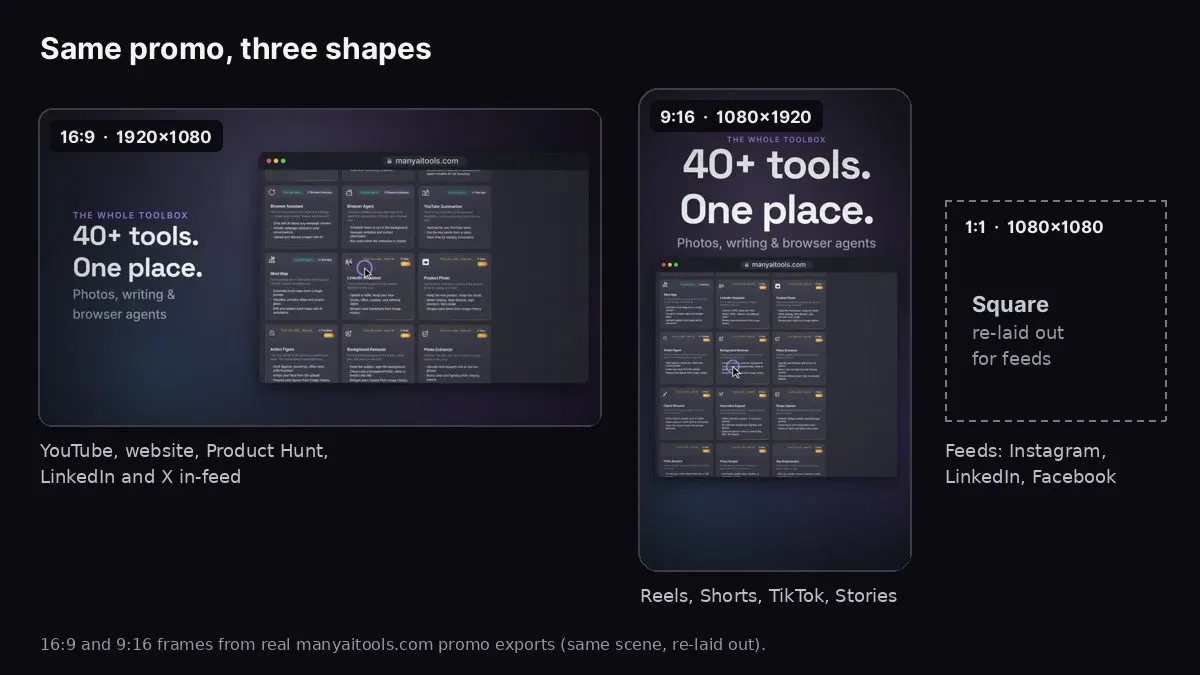
16:9 and 9:16 frames from our own manyaitools.com promo, made with Website to Promo Video.
The best video aspect ratio depends on where the video plays: 9:16 vertical (1080×1920) for Instagram Reels, TikTok, YouTube Shorts and Stories; 16:9 landscape (1920×1080) for YouTube, websites, Product Hunt and most presentations; and 1:1 square (1080×1080) or 4:5 (1080×1350) for in-feed posts on Instagram, Facebook and LinkedIn. If you only make one version, make the one for the place your audience actually watches, then re-lay out (don't just crop) for the others.
The image above shows the same 15-second manyaitools.com promo, made with our Website to Promo Video tool, in 16:9 and 9:16. Notice that the vertical version isn't a crop of the landscape one: the headline moves from beside the product to above it, the type gets bigger relative to the frame, and the screenshot fills the width. That's the difference between re-laying out and cropping.
This guide covers the sizes for each platform, what changes between shapes, safe zones for vertical video, and a simple plan for which versions to make.
Quick reference: aspect ratio by platform
These are the common, safe choices at the time of writing. Platforms change their specs often, so check the upload screen if something looks off.
- YouTube (regular videos): 16:9, 1920×1080.
- YouTube Shorts: 9:16, 1080×1920.
- TikTok: 9:16, 1080×1920.
- Instagram Reels: 9:16, 1080×1920.
- Instagram and Facebook Stories: 9:16, 1080×1920.
- Instagram feed: 4:5 (1080×1350) or 1:1 (1080×1080). Vertical 4:5 takes more of the screen.
- Facebook feed: 4:5 or 1:1 for mobile; 16:9 also works.
- LinkedIn feed: 1:1 or 4:5 take the most feed space; 16:9 works well for product demos. LinkedIn also supports vertical video.
- X (Twitter): 16:9 or 1:1 are the safe choices; vertical video also plays.
- Product Hunt gallery: 16:9, added as a YouTube link.
- Your website hero: 16:9 on desktop; consider a separate 9:16 or 1:1 file for mobile.
- Slides, sales decks and webinars: 16:9.
What the shapes are good at
16:9 landscape
The default for screens: laptops, TVs, YouTube, presentations. It's the natural shape for software, because desktop UIs are landscape. Use it for your website, YouTube, Product Hunt, sales decks, and as the master version of a product video.
Weak spot: on a phone held upright, a 16:9 video fills only about a third of the screen.
9:16 vertical
Full-screen on a phone. It's the shape of Reels, Shorts, TikTok and Stories, where most short video is watched. Use it for any video meant for mobile feeds or vertical ad placements.
Weak spot: desktop screenshots look tiny. Show phone screenshots, or crop desktop screens to one panel.
1:1 square and 4:5
A compromise for feeds that show both phones and desktops. Square was the feed standard for years; 4:5 is now common because it takes more vertical space on phones without being full-screen.
Weak spot: neither is native anywhere full-screen; they're for feeds.
Re-lay out, don't crop
Cropping a 16:9 video to 9:16 throws away about two thirds of the frame. Headlines get cut, screenshots lose their edges, and logos end up half off-screen. A proper vertical version is re-laid out:
- Text stacks above or below the product instead of beside it.
- Type gets bigger, because the frame is narrower and viewed on a small screen.
- Device frames can change: a wide browser frame may become a taller one, or a phone frame.
- Scenes may split: two features side by side become two scenes one after another.
In Website to Promo Video, you pick 16:9, 9:16 or 1:1 before generating, and after generating you can re-lay out the same video for another shape without starting over. It keeps the same brief, music and story, and rebuilds the layout for the new frame.
Safe zones for vertical video
Reels, Shorts and TikTok draw their own interface over your video: the caption and account name at the bottom, like/comment/share buttons on the right, and sometimes a header at the top. Anything important under those gets covered.
- Keep text and logos in the middle of the frame, away from roughly the bottom fifth and the right edge.
- Leave margin at the top for the platform header.
- Don't put the call to action at the very bottom. Put it in the centre, large.
- Check on a phone, in the app, with the interface on. A preview on your computer won't show the overlays.
Which versions should you make?
Most products don't need every shape. Pick by where your audience is:
- Launching a SaaS or web product: 16:9 for your website, YouTube and Product Hunt, plus 1:1 for LinkedIn and X.
- Launching a mobile app: 9:16 for Reels, Shorts and TikTok first, then 16:9 for your website. See how to make an app promo video.
- Running paid social ads: 9:16 for Reels/Stories placements and 1:1 or 4:5 for feed placements.
- B2B only: 16:9 and 1:1 usually cover it.
A practical routine: make the 16:9 master first (it's easiest to review), check the story and copy, then re-lay out to 9:16 and 1:1.
Already have a 16:9 video?
If you only have a landscape video and need a vertical one, you have three options, from worst to best:
- Letterbox it: put the 16:9 video in the middle of a 9:16 frame with blurred or coloured bars above and below. Quick, but the video ends up small and the bars waste most of the screen.
- Crop it: cut a 9:16 window out of the middle. Works for footage of people, but for product videos it cuts off text and half of every screenshot. If you crop, move the window per scene so the important part stays in view.
- Rebuild it: lay the same scenes out again for the new frame, with stacked text and larger type. This is the only option that looks native, and it's what the re-layout step in Website to Promo Video does for videos made there.
For short promos, rebuilding is usually faster than it sounds, because the script, music and screenshots stay the same.
Resolution, frame rate and file tips
- Resolution: 1080 on the short side (1920×1080, 1080×1920, 1080×1080) is the standard. Higher rarely helps on social, where platforms re-compress uploads.
- Frame rate: 30 fps is standard; 60 fps for very fast motion. Keep the same frame rate across versions.
- Format: MP4 with H.264 video and AAC audio uploads everywhere.
- Length: 15 seconds fits every placement; 30 seconds when you need more scenes.
- Text size: if you can't read it on your phone at arm's length, it's too small.
Website to Promo Video
Paste your site → a branded 15–30s promo with your screenshots, brand and AI music. MP4 in your browser.
FAQ
What's the best aspect ratio for Instagram? 9:16 for Reels and Stories; 4:5 or 1:1 for feed posts.
What aspect ratio is best for LinkedIn video? 1:1 or 4:5 take the most space in the feed, 16:9 works well for product walkthroughs, and LinkedIn also supports vertical video.
Can I use one video everywhere? You can, but it'll look wrong somewhere: a 16:9 video is small on phones, and a 9:16 video has big black bars on desktop. Two versions (16:9 and 9:16) cover most needs.
Does Website to Promo Video export 4:5? No. It exports 16:9, 9:16 and 1:1. For 4:5 feed placements, 1:1 is the closest built-in option.
Where can I learn what to put in each scene? See how to write a promo video script for 15 and 30 second templates.