How to Write a LinkedIn Post People Actually Read
Write a LinkedIn post with a strong first line, a simple structure, and real details: three example posts, spam habits to avoid, and a free AI post writer.
· 8 min read
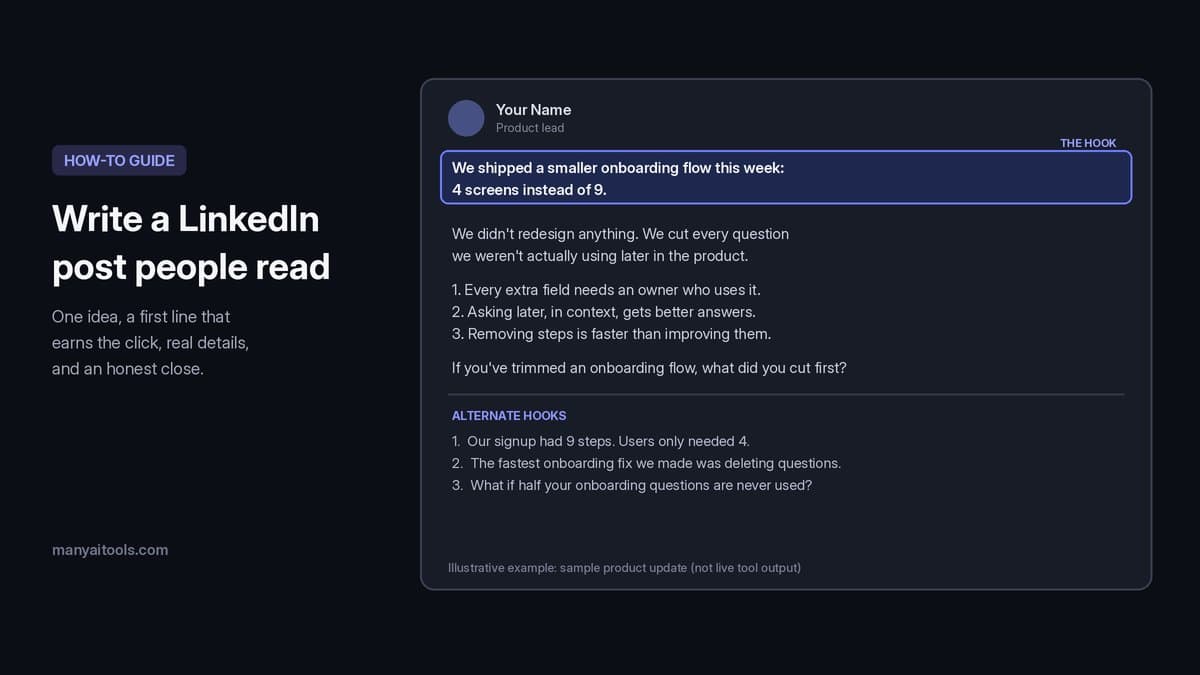
Example post and hooks for a sample product update (illustrative, not live tool output).
To write a LinkedIn post people actually read, pick one idea, open with a first line that makes that idea clear, keep paragraphs to one or two sentences, back the point with something real (a number you know, a mistake you made, a decision you took), and end with a takeaway or an honest question. Most good posts land between 120 and 250 words, with no more than three hashtags.
This guide covers why the first line matters so much, a simple structure you can reuse, three example posts you can adapt, the habits that make posts look like spam, and how to turn a rough idea into a paste-ready draft with AI.
Why the first line decides everything
LinkedIn shows only the first two or three lines of a post in the feed before the "...more" cut. If those lines don't give someone a reason to keep reading, the rest of the post doesn't matter.
A strong opening line usually does one of these:
- States the takeaway up front. "We cut our onboarding from 9 steps to 4, and support tickets dropped the next month."
- Names a specific moment. "Two weeks before launch, our signup flow broke for every Safari user."
- Disagrees with a common belief, honestly. "Posting every day didn't grow my audience. Posting one useful thing a week did."
- Asks a question your reader has. "How do you tell a hiring manager you were laid off without it sounding like an excuse?"
Avoid openers that could start any post: "I'm humbled to announce...", "Let's talk about leadership.", or "Agree?" They give the reader nothing to decide on.
A structure you can reuse
You don't need a template every time, but this shape works for most posts:
- Hook (1 line). The takeaway, the moment or the question.
- Context (1–2 short paragraphs). What happened, or why the topic matters right now. Keep it specific: the team, the product, the decision.
- The point (2–4 short paragraphs or a short list). What you learned, changed or recommend. One idea per paragraph.
- Close (1 line). A clear takeaway or one genuine question that invites people with real experience to reply.
- Hashtags (optional). Zero to three that match the topic. They help a little with discovery; ten of them make the post look automated.
Write it the way you'd explain it to a colleague over coffee. Short sentences, plain words, and white space between paragraphs make it easy to read on a phone, which is where most people will see it.
Three example posts
The posts below were written for this guide to show the pattern. They are examples, not live output from any tool, and the details are made up for illustration, so swap in your own facts.
Example 1: A career lesson
I used to say yes to every meeting. Last quarter I started declining half of them, and my best work came out of that quarter.

The rule I use now is simple: if I can't name what I'll decide or contribute, I ask for the notes instead.

What changed:
- Two free mornings a week for deep work
- Fewer status meetings, more written updates
- Nobody complained, because the notes were better than the meeting

The hard part wasn't saying no. It was admitting that being in the room had become my way of feeling useful.

What's one recurring meeting you'd drop tomorrow if you could?
Why it works: the first line gives the lesson and the result, the middle is concrete, and the closing question is easy to answer from experience.
Example 2: Shipping something
We shipped a smaller onboarding flow this week: 4 screens instead of 9.

We didn't redesign anything. We cut every question we weren't actually using later in the product. Company size, role and "how did you hear about us" all moved to optional settings.

Three things we learned:
1. Every extra field needs an owner who will use the answer.
2. Asking later, in context, gets better answers than asking upfront.
3. Removing steps is faster to build than improving them.

If you've trimmed an onboarding flow, what did you cut first?
Why it works: it states what shipped in the first line, explains the decision without hype, and shares lessons other builders can use.
Example 3: A hiring take
I read every cover letter for our last two hires. The ones that stood out did one thing: they answered the job post directly.

Not "I'm passionate about your mission." Instead: "You need someone who can run customer interviews. I ran 40 last year and wrote up every one."

If you're applying this month, try this: pick the two requirements that matter most in the posting and answer each one with a fact from your own work.

It takes ten minutes, and it's the clearest signal you read the post.
Why it works: a clear opinion, one before-and-after example, and an action the reader can take today. (If you're applying, our guide on how to write a cover letter with AI goes deeper.)
How to write a LinkedIn post with AI
If you have the idea but not the words, our LinkedIn Post Writer turns a topic or angle into a paste-ready draft. Here's the flow:
- Describe the topic or angle. The more specific, the better: "Lesson from shipping a broken onboarding flow: what we changed and why visibility matters" beats "onboarding". Include any real facts you want in the post, like a number or a decision.
- Add your audience (optional). "PMs and founders who post weekly" reads differently than "new graduates looking for their first role".
- Pick a tone. Professional, Storytelling or Contrarian. If you're stuck for an idea, the starter chips (Career lesson, Product ship, Hiring take, Writing tip) fill in an example angle you can edit.
- Generate the post. The draft streams in with a strong first line and short paragraphs, followed by three alternate hooks.
- Swap the hook if you like. If one of the alternate opening lines fits better, replace your first line with it. You don't need to regenerate the whole post.
- Copy, edit and post. Read it once in your own voice and change anything that doesn't sound like you.
The writer is set up to avoid the habits that make AI posts easy to spot. It won't invent employers, metrics, customers or credentials that weren't in your topic, so if you want a number in the post, put it in the topic. It skips engagement bait like "Comment YES if you agree", keeps hashtags to three or fewer, and goes light on emoji, with none at all for a professional tone.
Each draft uses about 12 credits, and new accounts get 100 free credits after Google sign-in, so you can try several drafts before buying anything. Credit packs start at $5 and also cover our cover letter, email and photo tools.
LinkedIn Post Writer
Turn a topic or angle into a paste-ready LinkedIn post with alternate hooks.
Habits that make a post look like spam
- Engagement bait. "Like if you agree" or "Comment 'guide' and I'll DM you" reads as a growth hack. Ask a real question instead, or just end on your takeaway.
- Hashtag walls. More than three hashtags usually signals automation. Pick the ones your audience actually follows, or skip them.
- Invented results. If you can't back a number up in a comment, don't post it. People who know your field will notice.
- One-sentence-per-line everything. Short paragraphs help; turning every sentence into its own line makes a post feel stretched out. Group related sentences together.
- Burying the point. If your best sentence is in paragraph four, move it to the top.
- Several ideas at once. A post about a launch, a hiring update and a lesson learned is three posts. Split them and post on different days.
Before you hit Post
- The first line makes sense on its own and gives a reason to keep reading.
- The post is about one idea.
- Every fact, number and name is something you can stand behind.
- Paragraphs are short and readable on a phone.
- It ends with a takeaway or an honest question, not a request for likes.
- Zero to three relevant hashtags.
- Your profile photo is current. If it isn't, LinkedIn Headshot turns a selfie into a studio-style photo.
Quick answers
How long should a LinkedIn post be? Most strong posts are around 120–250 words. That's long enough to make one point with a real example and short enough to read in under a minute. Go longer only if the story genuinely needs it.
What's a good hook for a LinkedIn post? A first line that states your takeaway, names a specific moment, or asks a question your reader already has. Test it by covering the rest of the post: if the first line alone doesn't make someone curious, rewrite it.
How many hashtags should I use on LinkedIn? Zero to three that match the topic. More than that rarely helps and can make the post look automated.
Should I use emoji in LinkedIn posts? A few can work in a casual or storytelling post. For professional topics, skip them or keep it to one.
Can I use AI to write LinkedIn posts? Yes, as long as the facts are yours and you edit the draft so it sounds like you. Give the AI a specific angle with real details, then read the draft once before posting. Our LinkedIn Post Writer won't add metrics or credentials you didn't provide.
Is there a free AI LinkedIn post generator? Our LinkedIn Post Writer is free to try: sign in with Google for 100 free credits, and each draft uses about 12. Packs start at $5 if you need more, and the same credits work across every tool on Many AI Tools.
Writing for email instead of the feed? Our guide on how to make an email sound more professional covers the same habits of clear, specific writing for the inbox.