How to Make an Email Sound More Professional (With Examples)
Simple rules, casual-to-professional phrase swaps, and three real before-and-after email rewrites: a payment chase, a polite no, and a client apology.
· 6 min read
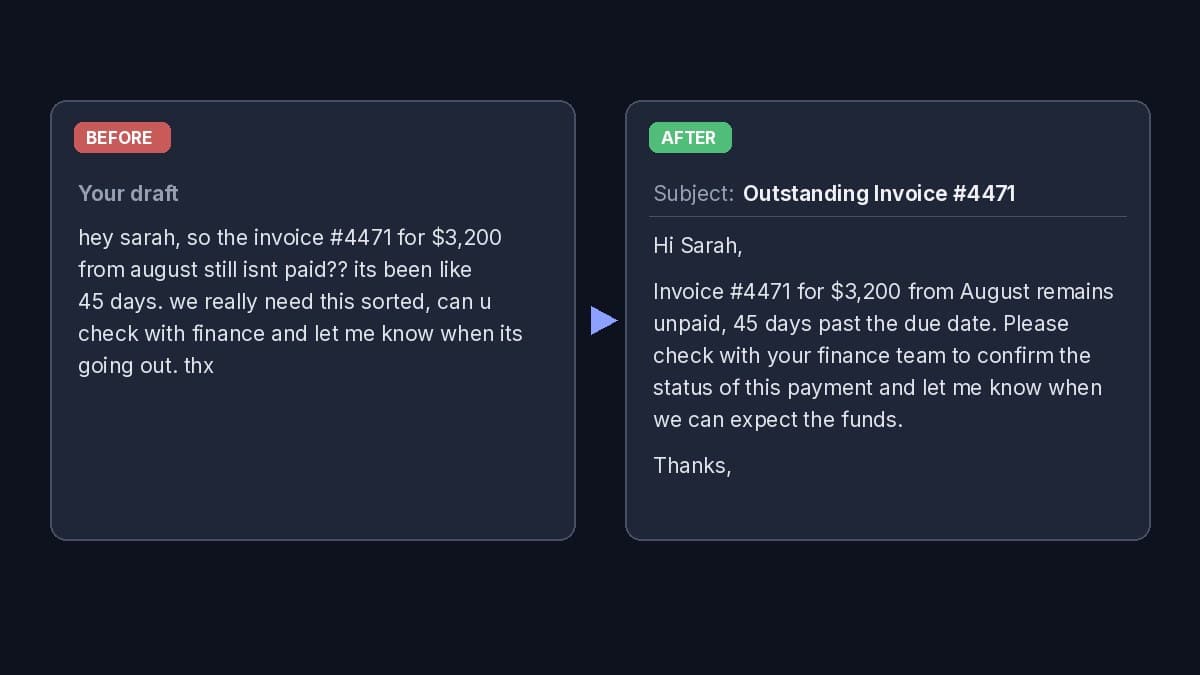
Real Email Rewriter output. Same facts, professional tone.
A professional email isn't about long words or stiff phrases. It's an email the reader can understand in one pass and act on without feeling pushed. Most drafts get there with a few small fixes: a clear opening line, complete sentences, calm wording and one specific ask.
This guide shows those fixes, a list of casual phrases with professional swaps, and three real before-and-after rewrites from our free Email Rewriter. The facts in each draft stay the same; only the wording changes.
What makes an email sound professional
- The point comes first. Say why you're writing in the first sentence. "I'm following up on invoice #4471" beats two lines of warm-up.
- One clear ask. Tell the reader exactly what you need and by when, if there's a deadline. If there are several asks, put them in a short list.
- Complete, correct sentences. Capital letters, full words ("you", not "u"), and normal punctuation. One question mark is enough.
- Calm, neutral wording. Replace frustration with facts. "It's been 45 days" is firmer than "it's been like 45 days??", because it sounds certain.
- No filler. Cut "just", "sorry to bother you", "I hope this email finds you well" and "per my last email". They either weaken the message or sound passive-aggressive.
- The right greeting and sign-off. "Hi [name]," works for almost all workplace email. Use "Dear [name]," for formal or first-contact messages. End with "Thanks," "Best regards," or "Best," plus your name.
- A subject line that names the topic. "Invoice #4471: payment status" tells the reader what's inside before they open it.
- Short. Three to six sentences covers most emails. If it's longer, break it into short paragraphs.
Casual phrases and professional swaps
- "hey" becomes "Hi [name],"
- "can u check" becomes "Could you check"
- "still isn't paid??" becomes "remains unpaid"
- "we really need this sorted" becomes "Please confirm when we can expect payment"
- "no i cant" becomes "Unfortunately, I won't be able to"
- "it's eating all my time" becomes "my time is fully committed to"
- "sorry we missed the deadline" becomes "Please accept my apologies for the delay"
- "just checking in" becomes "I'm following up on [topic]"
- "per my last email" becomes "As I mentioned on [date],"
- "ASAP" becomes "by [day or time]"
- "thx" becomes "Thanks," followed by your name
The pattern is the same every time: swap vague or emotional words for specific, neutral ones, and turn complaints into a request.
Example 1: A blunt payment chase
This draft is understandable, but it reads as annoyed: no capitals, double question marks, "like 45 days" and "u".
hey sarah, so the invoice #4471 for $3,200 from august still isnt paid?? its been like 45 days. we really need this sorted, can u check with finance and let me know when its going out. thx
Rewritten with the Follow up goal and a Confident tone:
Subject: Outstanding Invoice #4471
Hi Sarah,
Invoice #4471 for $3,200 from August remains unpaid, 45 days past the due date. Please check with your finance team to confirm the status of this payment and let me know when we can expect the funds.
Thanks,
What changed: the facts (invoice number, amount, month, 45 days) all stayed. The frustration became a plain statement, and "can u check" became a clear request with the next step spelled out. It's firmer than the original, not softer. Add your name under "Thanks," before you send.
Example 2: Saying no to a request
Here the colleague's message was pasted in as the email being replied to, so the rewrite answers it in context. The draft reply:
priya thanks but no i cant, im already on the migration project till end of nov and its eating all my time. maybe ask dev? he did it last year
Rewritten with the Polite decline goal, a Warm tone, and Shorter length:
Subject: Re: Q4 vendor review
Hi Priya,
Thanks for thinking of me. Unfortunately, I won't be able to lead this review. My bandwidth is fully committed to the migration project through the end of November.
Have you considered asking Dev? Since he led it last year, he might be a great fit.
Best, John
What changed: the "no" is still clear, which matters. A professional decline doesn't hide the answer. The reason is one sentence, and the suggestion of Dev turns a refusal into help.
Example 3: Apologizing to a client
Sorry we missed the friday deadline on the dashboard. our data source changed format and broke the import. fix is done, will deliver tuesday 10am. we wont charge for the extra days
Rewritten with the Apology goal, a Formal tone, and Longer length:
Subject: Status update: Dashboard delivery timeline
Dear Client,
I am writing to formally apologize for missing our agreed-upon deadline for the dashboard this past Friday.
The delay was caused by a sudden change in the format of our primary data source, which disrupted our import workflow. Our team has since corrected the issue, and we are currently finalizing the data integration. You will receive the completed dashboard no later than Tuesday at 10:00 AM.
We take full responsibility for this oversight. Consequently, we have waived all costs associated with these additional days of development. Please let me know if you have any questions regarding the updated timeline.
Best regards,
What changed: a good apology owns the problem, explains it in one or two sentences, and gives the fix with a date. All of that was in the draft; the rewrite puts it in order. Notice "Dear Client": the draft didn't name anyone, so the rewrite didn't invent a name. Replace it with the client's real name before sending.
When "professional" goes too far
Professional doesn't mean robotic. Watch for these when you edit, by hand or with AI:
- Overly formal words. "Kindly be advised" and "please find attached herewith" sound dated. "I've attached" is fine.
- Over-apologizing. One apology is enough. Three makes the problem sound bigger.
- Hedging everything. "I was just wondering if maybe" hides the ask. Say "Could you...?"
- Added promises. If a rewrite mentions a date, a discount or a next step you never offered, delete it. The examples above only use facts from the draft.
Make an email sound professional with AI
The fastest way to apply all of the above at once is the free Email Rewriter. Paste your draft, and if you're replying, add the email you got so the answer fits the thread. Then pick:
- Goal, such as Follow up, Polite decline, Apology, Ask / request, Reminder or Push back, or "Just improve it".
- Tone: Professional, Friendly, Formal, Confident, Direct, Warm, Apologetic or Casual. You can also describe your own, like "calm but urgent".
- Length: Shorter, Same or Longer, and the language to write in.
You get one send-ready rewrite with a subject line, a view of exactly what changed, and an alternative version only when there's a genuinely different way to say it. It keeps your facts and won't add deadlines or promises you didn't write.
Email Rewriter
Free AI email rewriter — paste a workplace draft for a professional rewrite with a subject line.
No draft yet? The AI Email Writer writes the whole email from a few notes and leaves a highlighted [placeholder] for any detail you didn't give it. For chasing an unanswered message, see how to write a follow-up email.
Quick checklist before you send
- The first sentence says why you're writing.
- There's one clear ask, with a date if it matters.
- No "u", "thx", "??", or all-caps words.
- The greeting uses their name, and the sign-off has yours.
- The subject line names the topic.
- Every fact, number and date matches the original thread.