How to Make a GTA 6 Style Profile Picture From Your Photo
Turn a selfie into a GTA 6 style profile picture with AI: which photo to use, the neon styles, props and wanted stars, prompt ideas, and how to crop it.
· 5 min read
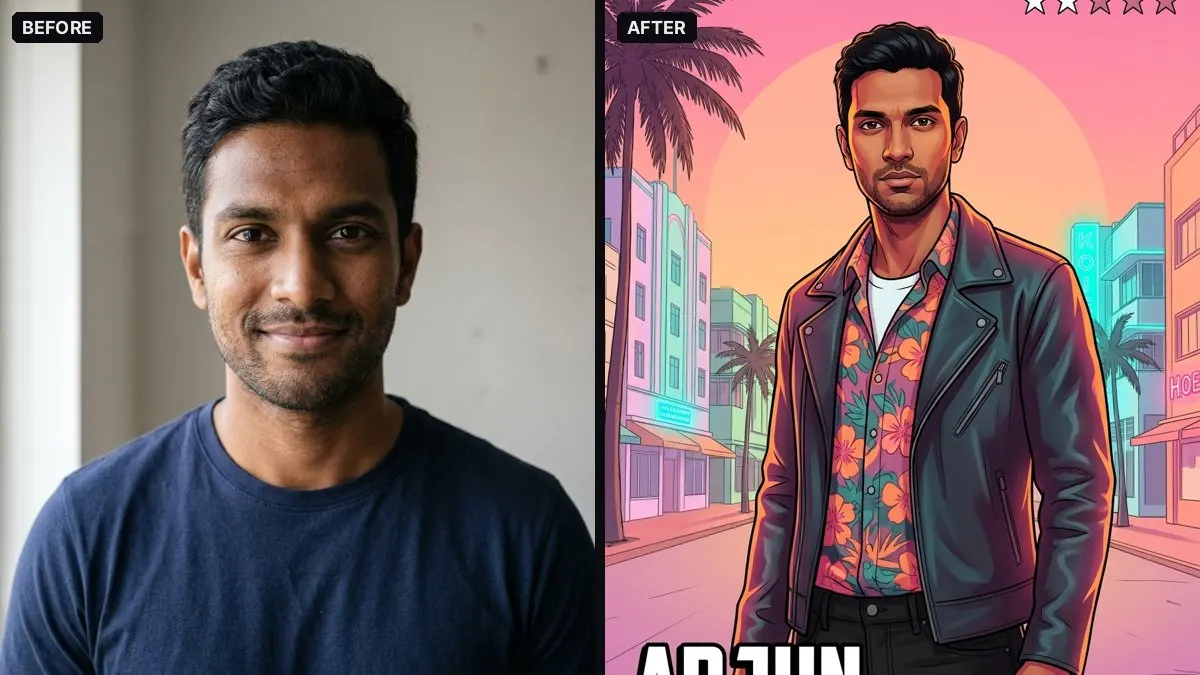
Real output from Crime Saga Poster: Neon beach sunset style, title "ARJUN", 2 wanted stars. The person is AI-generated.
To make a GTA 6 style profile picture from your photo, upload a sharp, front-facing selfie to an AI poster tool, pick a neon art style, add your name as the title, and generate. The model redraws you as loading-screen art (inked outlines, cel-shaded skin, a sunset palette) while keeping your face. Then crop the result to a square or circle for your profile.
The image above is a real result from our Crime Saga Poster tool. On the left is a plain photo in a navy T-shirt. On the right is the Neon beach sunset style with the title "ARJUN" and a two-star wanted level. The face, hair, beard and expression carry over. The tool adds the outfit, the palm-lined boulevard, the sunset and the lettering.
This guide covers what makes a GTA-style portrait work as a profile picture, how to take a photo the AI can use, which options to pick, prompt ideas for the free-text box, and how to crop the result.
What makes it read as "GTA style"
Open-world crime game key art has a recognisable look, even at the size of a profile picture:
- Ink and cel shading. Bold black outlines, two or three flat tones on skin and clothes, and a warm rim light along one side of the face.
- A loud palette. The newer look leans on magenta, hot orange and teal; the older loading screens use ochre, olive and dusty orange.
- A place behind you. Palm trees, art-deco hotels, a city skyline or a highway, painted rather than photographed.
- A confident pose. A three-quarter turn, a slightly low camera angle and a direct look into the lens.
- Game details. Wanted stars in a corner, a cash bag, a car or a name in heavy title lettering.
Crime Saga Poster builds every prompt from those ingredients. It doesn't copy any game's logo, characters or font, so the title lettering is original.
Step 1: Pick the right photo
The model keeps the face from your upload, so the photo sets the ceiling for likeness.
- Face the camera. A slight angle is fine. A profile or a strong tilt gives the model less to keep.
- Use even light. Face a window. Hard overhead light makes the cel shading look muddy.
- Be the only person in the frame. Group shots confuse it about whose face to keep.
- Skip sunglasses and heavy filters. Beauty filters and portrait-mode blur smear the edges the model needs.
- Show your shoulders. A chest-up crop gives the AI room to draw the outfit and pose.
You can upload JPG, PNG, WEBP, GIF or BMP files up to 10 MB, or paste an image from your clipboard.
Step 2: Choose a style
Open Crime Saga Poster and drop in your photo. For a GTA 6 style profile picture, start with one of the two neon styles:
- Neon beach sunset: magenta, orange and teal, with a palm-lined art-deco boulevard at golden hour. The closest match to the newest trailers' look, and it stays bright and readable at small sizes.
- Neon city night: wet streets, pink and teal neon rim light and deep violet shadows. Moodier, and good if your profile theme is dark.
The other two styles, Classic 2000s cover and East Coast noir, are covered in our guide to the four styles.
 Neon city night, Rooftop skyline scene, Motorbike prop, 3 wanted stars.
Step 3: Set the options
Every option is optional. For a profile picture, keep it simple so your face stays the focus:
- Scene: leave it on Match style to get the style's default backdrop, or pick Beach & palms, Rooftop skyline, Police chase or Mansion & yacht.
- Props: choose up to three from Cash stack, Sports car, Motorbike, Prop pistol, Sidekick and Helicopter. One prop is usually enough for a profile picture; more crowds the frame.
- Wanted level: one to five stars, drawn in the top-right corner.
- Layout: Hero poster gives a vertical 3:4 portrait, the easiest shape to crop. Loading-screen collage and Wanted poster are better for banners and posts.
- Title text: up to 24 characters, such as your first name or a handle. It's drawn in heavy, original game-title lettering.
Then click Make my poster. When it's done, click Download. Every result is saved to Image History, so you can go back to an earlier version.
Prompt ideas for the "Your own idea" box
The free-text box takes up to 300 characters. Short, concrete details work best:
- "Wearing a white linen suit, gold chain"
- "Holding an iced coffee instead of cash"
- "Mumbai skyline at dusk behind me"
- "Leather jacket and aviator sunglasses pushed up on my head"
- "My golden retriever sitting next to me"
- "Pink convertible, top down" (with the Sports car prop)
Describe clothes, places and objects rather than other people. The tool won't generate real people or celebrities, so leave out famous names.
Step 4: Crop it for your profile
Most platforms show profile pictures as a circle cut from a square, so:
- Crop a square from the top of the 3:4 poster, with your face slightly above center.
- Check it at thumbnail size. If the title text gets cut by the circle, either crop tighter so it disappears, or move it into the frame.
- If you want the title visible, choose a short one. "ARJUN" fits; a 24-character name may not survive a circle crop.
 Neon beach sunset, Hero poster, title "ARJUN", 2 wanted stars. The full result before cropping.
Check the likeness
The prompts ask the model to keep your face shape, eyes, nose, mouth, hairline and skin tone. AI can still drift, so compare the result with your photo. If it doesn't look like you, try a sharper, better-lit photo first, then generate again. Each run is a fresh draw, so a second try often fixes a small likeness miss.
What it costs
Each poster uses about 155 credits, because image models cost more to run than text. New accounts get 100 free credits, which isn't enough for one poster, so you'll need a credit pack for your first. The $5 Starter pack has 5,000 credits, enough for about 32 posters. See pricing for all packs.
Crime Saga Poster
Make a GTA-style profile picture: turn a photo into GTA 6 style loading-screen art with inked outlines, neon sunsets, wanted stars, cash, cars and your name in game-title lettering.
Frequently asked questions
Can I make a GTA 6 style picture of myself for free?
Each poster uses about 155 credits. New accounts get 100 free credits, which isn't quite enough for one poster, so you need a credit pack for your first. The $5 Starter pack covers about 32 posters.
Will it still look like me?
The prompt tells the model to keep your face shape, eyes, nose, mouth, hairline and skin tone. Results can drift, so compare with your photo and generate again with a sharper, front-facing photo if needed.
Does it use the real GTA logo or font?
No. The look is GTA-style, but the title lettering is original and the prompts ask for no logos, badges or readable signs other than your title.
What size is the result?
The Hero poster and Wanted poster layouts are vertical 3:4 images. The Loading-screen collage is a wide 16:9 image. Crop a square from the top of a 3:4 poster for a profile picture.
Can I use a photo of a friend or a celebrity?
Use photos of people who have agreed to it. The tool won't generate real celebrities or public figures.
Make your poster
Make a GTA-style profile picture: turn a photo into GTA 6 style loading-screen art with inked outlines, neon sunsets, wanted stars, cash, cars and your name in game-title lettering.
Open Crime Saga Poster