GTA Loading Screen Art From Your Selfie: Styles Explained
The 4 GTA-style loading screen looks explained, from neon beach sunset to East Coast noir, plus scenes, props, wanted stars and layouts for your selfie.
· 6 min read
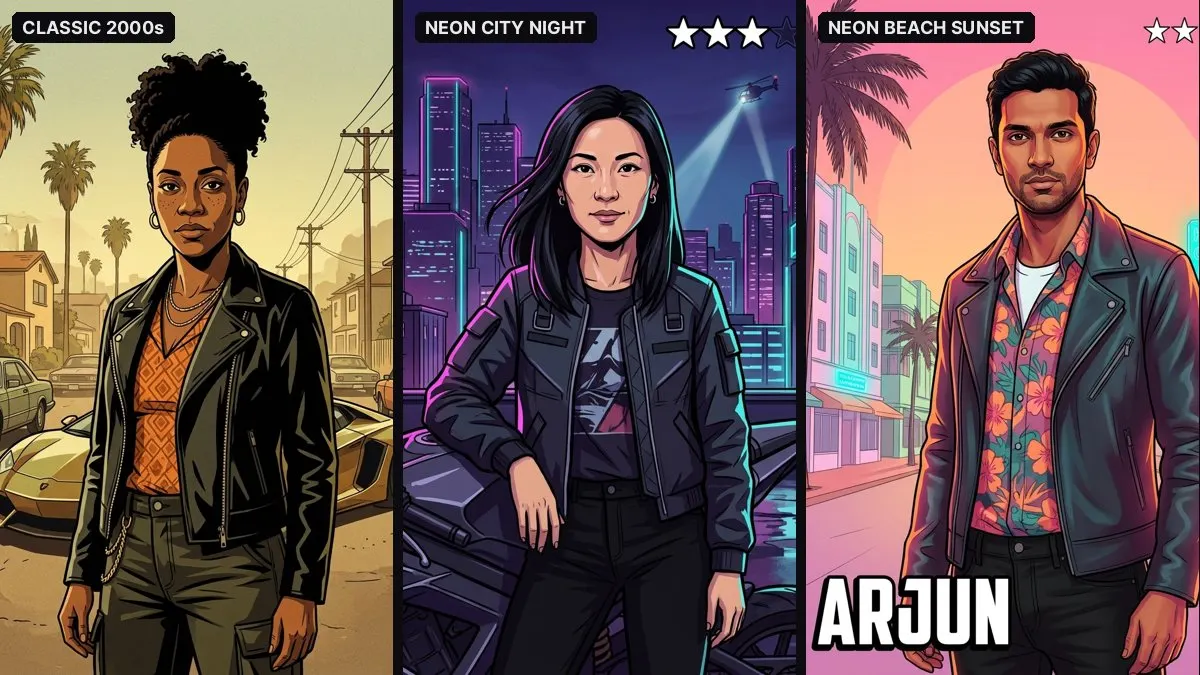
Real outputs from Crime Saga Poster in three of the four styles. The people are AI-generated.
GTA loading screen art is the painted, inked key art you see between missions: one character in a bold pose, a loud palette, a city behind them and a few props that tell the story. To make your own from a selfie, upload a clear photo to an AI poster tool, choose one of four styles, add a scene and up to three props, and pick a layout. The model keeps your face and paints everything else.
The image above shows three real results from our Crime Saga Poster tool, one per style: Classic 2000s cover, Neon city night and Neon beach sunset. This guide explains each style, then the scenes, props, wanted stars and layouts, so you know what to pick before you spend credits.
The four styles
Each style sets the rendering (how the ink and shading look), the palette, and a default backdrop for when Scene is left on Match style.
Neon beach sunset
The newest GTA 6 style look: a semi-realistic hand-painted illustration with crisp black outlines, cel-shaded skin blended with soft airbrushed gradients, a warm rim light, and a magenta, hot-orange and teal palette. The default backdrop is a palm-lined art-deco beach boulevard at golden hour, with neon signs that don't spell readable words.
Pick it for: profile pictures, bright posts and anything that needs to read at small sizes. See the GTA 6 style profile picture guide for a full walkthrough.
Neon city night
Cover art at night: bold outlines, hard-edged cel shadows, magenta and electric-teal rim light, deep violet shadows and glossy wet reflections. The default backdrop is a rain-slick downtown avenue with art-deco facades and palm silhouettes.
Pick it for: dark-mode profiles, moody stories and rooftop or motorbike scenes.
 Neon city night, Rooftop skyline, Motorbike, 3 wanted stars.
Classic 2000s cover
The early-2000s loading screen: heavy confident outlines, flat graphic shadow shapes, a slightly grainy printed-poster texture and a warm ochre, olive and dusty-orange palette under a hazy sky. The default backdrop is a sun-baked 1990s West Coast street with palms, power lines, stucco houses and invented vintage cars.
Pick it for: nostalgia, wanted posters and anything that should feel like an old game box.
 Classic 2000s cover, Match style scene, Sports car prop.
East Coast noir
Gritty noir key art: inky outlines, heavy blacks, painterly texture and a cold blue-grey palette with one accent of amber streetlight, plus falling rain. The default backdrop is a rainy harbour city at dusk with steel bridges, brick tenements and steam from the street grates.
Pick it for: dramatic, serious looks, especially chase scenes and collages.
Scenes
Match style uses the style's own backdrop. The other four scenes replace it:
- Beach & palms: a sunset beach with a lifeguard tower, turquoise water and a pastel boardwalk.
- Rooftop skyline: a rooftop at night above a city skyline, wind in your hair, a distant helicopter light.
- Police chase: a highway chase with invented patrol cars, flashing red and blue lights, a helicopter searchlight and motion streaks.
- Mansion & yacht: a hillside mansion terrace with an infinity pool and a yacht in the marina below.
Scenes combine with any style: Police chase in Neon beach sunset looks sunny and wild, while the same scene in East Coast noir looks like a rainy getaway.
Props
Pick up to three. Each is described to the model as an original design with no badges or plate lettering:
- Cash stack: a duffel bag stuffed with cash, a few bills in the air.
- Sports car: an invented exotic car behind you.
- Motorbike: an invented sport bike you lean on.
- Prop pistol: a stylised cartoon prop held at your side and pointed at the ground. No one is targeted and there's no blood.
- Sidekick: one invented adult partner-in-crime in streetwear, with a different face and a friendly, non-romantic pose.
- Helicopter: a helicopter with a searchlight in the top-left of the sky.
Wanted stars
Set one to five stars and they're drawn as a game-style row in the top-right corner. On the Wanted poster layout they sit on the paper instead. Leave it at zero for no stars.
Layouts
- Hero poster: one vertical 3:4 portrait, chest-up to mid-thigh, low camera angle. The best layout for profile pictures and phone wallpapers.
- Loading-screen collage: a wide 16:9 image of four to six tilted panels. The largest panel is your portrait; the others show you in short action moments from your scene and props. Good for banners, desktop wallpapers and YouTube thumbnails.
- Wanted poster: a vertical mugshot on weathered paper with "WANTED" and a bounty. See the wanted poster guide for alias ideas.
 East Coast noir, Police chase, Helicopter + Cash stack, 4 wanted stars, Loading-screen collage.
Prompt ideas for the "Your own idea" box
Use the 300-character box for details the options don't cover:
- "Neon sign shapes in the colours of my football club"
- "Wearing a tracksuit and gold sneakers"
- "Rain-soaked trench coat, collar up" (great with East Coast noir)
- "Sunset over the Bandra–Worli Sea Link"
- "Holding a skateboard instead of cash"
- "Collage panel of me ordering street tacos"
Describe outfits, places and objects. Don't name real people; the tool won't generate celebrities.
Quick recipes
- Profile picture: Neon beach sunset, Match style, no props, Hero poster, your first name as the title.
- Banner: East Coast noir, Police chase, Helicopter + Cash stack, four stars, Loading-screen collage.
- Party invite: Classic 2000s cover, Wanted poster, five stars, a funny alias.
Each poster uses about 155 credits. New accounts get 100 free credits, and the $5 Starter pack (5,000 credits) covers about 32 posters. See pricing.
Crime Saga Poster
Make a GTA-style profile picture: turn a photo into GTA 6 style loading-screen art with inked outlines, neon sunsets, wanted stars, cash, cars and your name in game-title lettering.
Frequently asked questions
Which style looks most like GTA 6?
Neon beach sunset: magenta, orange and teal with a palm-lined art-deco boulevard. Neon city night is the darker alternative.
How many props can I add?
Up to three, from Cash stack, Sports car, Motorbike, Prop pistol, Sidekick and Helicopter.
Which layout should I use for a wallpaper or banner?
Loading-screen collage, a wide 16:9 image of four to six panels. For a phone wallpaper or profile picture, use the vertical Hero poster.
Is the prop pistol violent?
It's drawn as a stylised cartoon prop held at the side and pointed at the ground, with no one targeted and no blood. Leave it off if you prefer.
Are the cars real brands?
No. Cars and motorbikes are described to the model as invented designs with no badges or plate lettering.
Make your loading screen
Make a GTA-style profile picture: turn a photo into GTA 6 style loading-screen art with inked outlines, neon sunsets, wanted stars, cash, cars and your name in game-title lettering.
Open Crime Saga Poster