How to Write Better ChatGPT Prompts (With Examples)
The parts of a good prompt, three before-and-after rewrites, common mistakes, and how to turn a rough idea into a full prompt for ChatGPT, Claude or Gemini.
· 8 min read
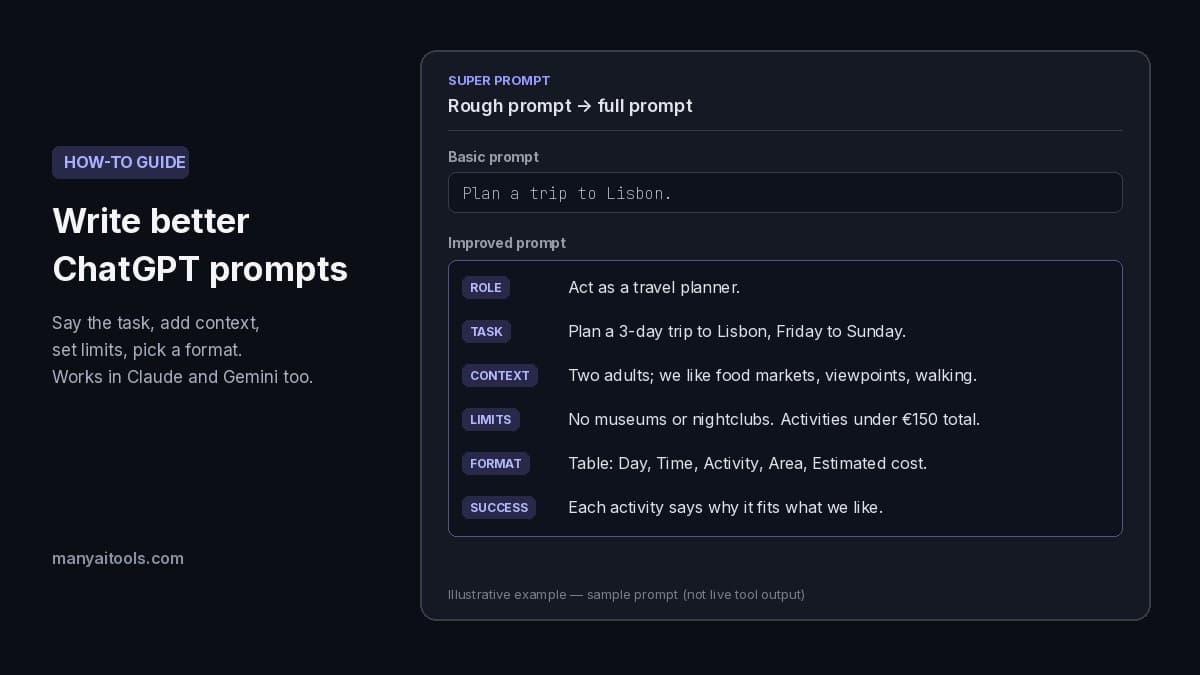
Example rewrite of a sample prompt (illustrative, not live tool output).
To write a better ChatGPT prompt, say exactly what you want done, add the context the AI can't guess (who it's for, what you already have, what it's for), set the limits that matter (length, tone, what to leave out), and describe the format you want back. Then read the answer and tighten the prompt with a follow-up instead of starting over. A vague prompt gets a generic answer; a specific one usually gets something you can use on the first try.
This guide breaks a good prompt into its parts, shows three before-and-after rewrites you can copy, lists the mistakes that cause most bad answers, and explains how to turn a rough prompt into a full one in a few seconds. Everything here works the same way in Claude, Gemini and other chat models, not just ChatGPT.
Why short prompts get generic answers
A chat model only knows what's in your message. When you type "write a blog post about remote work", it has to guess the audience, the angle, the length, the tone and the format, and it fills each gap with the most average choice. The result reads fine but fits nobody.
Most "bad" AI answers are really missing-information problems. The fix is rarely a clever trick or a magic phrase. It's telling the model the same things you'd tell a capable new colleague before handing them the task.
The parts of a good prompt
You don't need all of these every time, but checking the list before you send catches most gaps.
- The task. One clear sentence with a verb: write, summarize, compare, explain, plan, fix. "Summarize this report" is a task; "the report" is not.
- Context. Who the result is for, why you need it, and what you already have. "For our CFO, who will skim it before a budget meeting" changes the answer more than any other line.
- A role (optional). "Act as an experienced travel planner" sets the vocabulary and level of detail. It helps, but it matters less than the task and context, and it can't make up for missing facts.
- Constraints. Length, tone, reading level, budget, deadline, what to avoid. "Under 150 words, no jargon, don't recommend paid tools."
- Output format. Bullet points, a table with named columns, numbered steps, a draft email with a subject line, code in one block. If you plan to paste the answer somewhere, describe that shape.
- What a good answer looks like. One line on how you'll judge it: "Each recommendation should include a reason and a cost." This is the part people skip most, and it's what separates a usable first answer from a passable one.
- Examples or source material (when you have them). Paste the text, data or a sample of the style you want, and mark where it starts and ends so the model doesn't confuse it with your instructions.
A quick way to remember it: task, context, limits, format. Add a role and a quality bar when the job is important.
Three before-and-after rewrites
The rewrites below were written for this guide to show the pattern. They are examples, not live output from any tool, so adjust the details to your own situation.
Example 1: Plan something
Before:
Plan a trip to Lisbon.
After:
Act as a travel planner. Plan a 3-day trip to Lisbon for two adults in their 30s, arriving Friday morning and leaving Sunday night. We like food markets, viewpoints and walking; we don't want museums or nightclubs. Keep it to public transport and walking, with a total activity budget under €150 for both of us.

Give the plan as a table with columns: Day, Time of day, Activity, Area, Estimated cost. After the table, list three backup ideas for a rainy afternoon. Every activity should include a short reason it fits what we like.
What changed: the dates, the travelers, likes and dislikes, a budget, a format you can scan, and a quality bar ("a short reason it fits").
Example 2: Summarize a document
Before:
Summarize this.
[pasted report]
After:
Summarize the report between the triple quotes for our head of finance, who will read it on her phone before a budget meeting.

Write 5 bullet points, each under 25 words, covering costs, risks and decisions needed. Then add one line starting with "Decision needed:" if the report asks for an approval. Use only facts from the report; if something important is missing, say so instead of guessing.

"""
[pasted report]
"""
What changed: the reader and how she'll read it, a length limit per bullet, the topics that matter, a clear marker around the source, and an instruction not to fill gaps with guesses.
Example 3: Fix some code
Before:
Why doesn't my code work?
[pasted code]
After:
I'm building a small Python 3.12 script that reads a CSV and totals the "amount" column. It crashes with: ValueError: could not convert string to float: '$24.50'.

Explain the cause in one or two sentences, then give the corrected function in a single code block. Keep my variable names and don't add new libraries. Only change what's needed to fix the error.

[pasted function]
What changed: the language and version, the exact error message, what the code is supposed to do, and limits on how much the answer may change.
How to turn a rough prompt into a full one with AI
If you know what you want but writing all of that out feels slow, our free Super Prompt tool does the rewrite for you. Here's the flow:
- Add context (optional). A sentence or two about your situation, audience or source material, for example "I'm a teacher preparing a lesson for 10th graders who struggle with math."
- Paste your basic prompt, as rough as it is: "Create a lesson about quadratic equations."
- Choose Transform Prompt. The improved prompt streams in as it's written.
- Copy it into ChatGPT, Claude, Gemini or any other chat model.
Super Prompt keeps your original intent and adds what's usually missing: a clear role, constraints, an output format and success criteria. If you add context, it folds that into the prompt so you don't have to paste the context separately. You get back only the improved prompt, with no preamble or explanation, so it's ready to paste. It also tries to keep the prompt as short as it can while still being specific.
Read the result once before you use it. You know details the tool doesn't, such as a real budget, a deadline or a name, so add or correct anything that matters. Each transform uses about 5 credits, and new accounts get 100 free credits after Google sign-in.
Super Prompt
Free AI prompt optimizer — rewrite a rough idea into a clear instruction for ChatGPT, Claude, Gemini, or any model.
Common prompt mistakes (and quick fixes)
- Asking two jobs at once. "Write a product description and a launch plan and social posts" splits the model's attention. Ask for one, review it, then ask for the next in the same chat.
- Leaving out the reader. "Explain inflation" has very different right answers for a 10-year-old, a student and an economist. Say who it's for.
- No length limit. Without one you often get either a one-liner or an essay. Give a number: words, bullets, paragraphs or minutes of reading.
- Only saying what not to do. "Don't be boring" doesn't tell the model what to do instead. Say "use short sentences and one concrete example per point."
- Mixing instructions and pasted text. Put source material at the end, between clear markers like triple quotes, and say "use only the text between the quotes."
- Starting over after a weak answer. The follow-up is often the fastest fix: "Shorter, and drop the third point" or "Same plan, but for a family with two kids." The model keeps the earlier context.
- Trusting facts without checking. A clearer prompt reduces made-up details but doesn't remove them. Ask the model to say when it's unsure, and check names, numbers and sources before you rely on them.
Use follow-up prompts to refine
Treat the first answer as a draft. Useful follow-ups:
- "Ask me up to 5 questions you need answered to do this well, then wait." Good when you're not sure what context matters.
- "Give me three different versions: formal, friendly and very short."
- "What assumptions did you make? List them."
- "Rewrite this for [new audience] and keep everything else the same."
- "Turn this into a checklist I can copy."
If you find yourself writing the same long setup at the start of every chat, that setup belongs in a system prompt or custom instructions instead. Our Agent Instructor writes that kind of standing instruction (persona, goals and constraints) for custom GPTs and AI agents.
Before you send your prompt
- The task is one clear sentence with a verb.
- You said who it's for and why you need it.
- Limits are explicit: length, tone, budget, deadline, what to avoid.
- The output format matches where you'll paste it.
- You said what a good answer looks like.
- Pasted text is at the end, between clear markers.
- You're ready to send one or two follow-ups instead of starting over.
Quick answers
What makes a good ChatGPT prompt? A clear task, the context the AI can't guess, explicit limits like length and tone, and the format you want back. Adding what a good answer looks like makes the first reply far more likely to be usable.
Should I tell ChatGPT to act as an expert? It can help set the level of detail and vocabulary, so it's worth one line. But a role can't replace context. "Act as a nutritionist" with no details about the person still gets a generic answer.
How long should a prompt be? As long as it needs to be to remove guessing, and no longer. For a quick question one line is fine. For anything you'll publish, send or act on, a short paragraph plus a format line is normal.
Do the same prompts work in Claude and Gemini? Yes. Clear tasks, context, limits and formats help every chat model. Small differences in style and length are normal, so do a follow-up if one model's answer is longer or shorter than you wanted.
Is there a free AI prompt optimizer? Our Super Prompt tool is free to try: sign in with Google for 100 free credits, and each transform uses about 5. Credit packs start at $5 if you need more.
What's the difference between a prompt and a system prompt? A prompt is the message you send for one task. A system prompt (or custom instructions) is a standing instruction that shapes every reply in a chat or an AI agent, such as its role, tone and rules. Use Agent Instructor to write one.
Want to see how a specific prompt changes the result? Our guide on how to make a mind map with AI shows how naming the goal, the audience and one constraint turns a generic map into a useful one.