How to Make a Mind Map With AI (Free & Editable)
Make a free AI mind map from any topic: get branches in seconds, edit and expand them with follow-up prompts, then save it for study, plans or notes.
· 7 min read
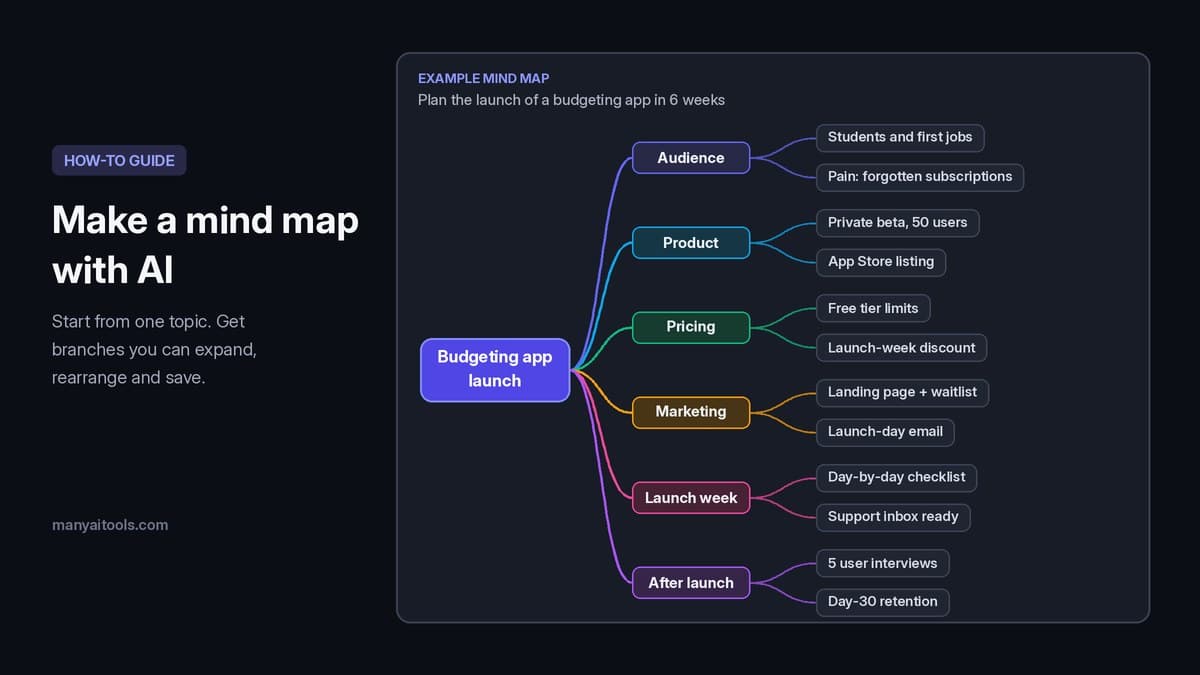
Example mind map structure for a sample topic.
To make a mind map, write your main topic in the middle of a page, draw a few branches out from it for the big ideas, then add smaller branches to each one for details. Keep every label to a word or a short phrase. That's the whole method, and you can do it with a pen, a whiteboard or an AI tool that drafts the first version for you.
This guide covers when a mind map is the right tool, how to draw one by hand, and how to make one with AI in a couple of minutes, including a full worked example and the prompts that get the best results.
What a mind map is, and when it beats an outline
A mind map is a diagram that puts one idea in the center and arranges related ideas around it as branches. Each branch can split into smaller branches, so the picture grows from general to specific as you move outward.
An outline does something similar, but in a straight line from top to bottom. That works well when you already know the order of things. A mind map works better when you don't, because you can add an idea wherever it belongs without rewriting everything below it. It also shows you at a glance which parts of a topic are thick with detail and which are still empty.
Mind maps are especially useful for:
- Brainstorming. You get ideas down fast and sort them later, instead of stalling on what comes first.
- Studying. A chapter or a lecture becomes one page that shows how the concepts connect, which is easier to review than pages of notes.
- Project planning. Each branch becomes a workstream, and the smaller branches become tasks.
- Content outlines. For an essay, a talk or a blog post, the branches turn into sections and the sub-branches into the points under each.
If you need a numbered sequence of steps, such as a recipe, a linear list is still clearer. Many people use both: a mind map to think, then an outline to write.
How to make a mind map by hand
- Write the central topic in the middle of a blank page, and circle it. Make it specific. "Marketing" is too broad to be useful; "Marketing plan for our spring sale" gives every branch a clear job.
- Add 4 to 6 main branches. These are the big categories, like Audience, Budget, Channels and Timeline. If you have more than seven, some of them probably belong under each other.
- Add 2 to 4 sub-branches to each. These are the details, examples or tasks. Keep going one more level only where you need to.
- Use short phrases, not sentences. "Email the 2024 customers" fits on a branch. A full paragraph means the idea needs to be split.
- Step back and rearrange. Move ideas that ended up in the wrong place, merge branches that overlap, and mark the gaps.
Color helps, too. Giving each main branch its own color makes the map easier to scan and remember.
Paper is fast and free, but it gets messy once you start moving things around, and it's hard to share. That's where a digital map, and especially an AI draft, saves time.
How to make a mind map with AI
An AI mind map generator writes the first draft for you. You describe the topic, it proposes the branches, and you spend your time fixing and deepening the map instead of staring at a blank page. Here's how it works in our free AI Mind Map tool:
- Write a specific prompt. Include the goal, who it's for and any limits that matter, such as a deadline or a budget. "Plan the launch of a budgeting app for students in 6 weeks, with no paid ads" will give you a far more useful map than "app launch."
- Press Generate. The map builds on screen as the AI writes it. Mind Map leans toward plans: it lays your topic out as a path toward the goal, with branches for each part of the work, and steps you can act on appear as checkboxes you can tick off later.
- Look it over before you change anything. Drag nodes to tidy the layout, switch between left-to-right and top-to-bottom, and collapse branches you're happy with so you can focus on the rest.
- Refine it with follow-up prompts. Once a map exists, the same box edits it instead of starting over. Type an instruction like "Add a branch for pricing with three options" or "Split Marketing into before launch and launch day," and the AI updates the map while keeping the rest of it in place.
- Save it. When you're signed in, save the map to your account and reopen it later to keep working. To drop it into a slide or a doc, open it full screen, fit it to the view and take a screenshot.
The best results come from treating the first map as a draft. The AI is good at suggesting branches you hadn't thought of, but you know your situation, so expect to cut a few things and push on others.
Worked example: planning a product launch
Here's the kind of structure a good first map should give you. The topic is a made-up one: a small team launching a budgeting app for students and people in their first job, six weeks from now. The outline below is an illustrative example written for this guide, not a screenshot of live tool output, and the image at the top of the page shows the same map with two items per branch.
Prompt:
Plan the launch of a budgeting app for students and people in their first job, 6 weeks from today, with a team of three and no budget for paid ads.
Mind map structure:
- Budgeting app launch (6 weeks)
- Audience
- Students and people in their first job
- Main pain: forgotten subscriptions
- Where they spend time: Reddit, TikTok, campus groups
- Product
- Private beta with 50 users
- Fix the top 5 beta bugs
- App Store and Play Store listings
- Pricing
- Free tier limits
- Monthly vs yearly plan
- Launch-week discount
- Marketing
- Landing page with a waitlist
- Launch-day email to the waitlist
- Short demo video for social posts
- Launch week
- Day-by-day checklist
- Support inbox staffed
- Track daily signups
- After launch
- Five user interviews
- Ask happy users for reviews
- Check day-30 retention
- Audience
Notice how specific the branches are. Because the prompt named the audience, the timeline and the "no paid ads" limit, the Marketing branch is about a waitlist and a demo video instead of an ad budget. A vague prompt would have produced generic branches like "Social media" and "SEO" that you'd have to rewrite anyway.
From here, good follow-up prompts would be "Break Launch week into one node per day" or "Add owners for each Product task: Priya, Sam and Lee." Each one deepens a single branch without disturbing the others.
Tips for a better mind map
- Specific prompts beat vague ones. Name the goal, the audience and the constraint. "Study plan for the causes of World War I, for a high school exam in two weeks" beats "World War I."
- Phrase study topics as a goal. Because Mind Map builds toward an outcome, "Understand photosynthesis well enough to explain it in an exam" tends to give a clearer map than the bare word "photosynthesis."
- Edit one branch at a time. Small, focused instructions are easier to check. If you ask for five changes at once, it's harder to spot what moved.
- Keep labels short. If a node needs a sentence, it probably needs to become two nodes.
- Start from real material. Meeting notes, a lecture summary or the key points from a video make a stronger starting point than a topic alone, because the map reflects what was actually said. If your source is a video, summarize the YouTube video first, then paste the key points into your prompt and ask for a map of the main ideas.
- Use it for planning writing. For an essay or a post, ask for a map of the argument, then turn each main branch into a section heading.
- Sharpen a thin prompt first. If you aren't sure how to describe the topic, Super Prompt can turn a rough idea into a fuller brief you can paste in.
Mind Map
Turn a prompt into an interactive mind map you can edit, expand, and rearrange.
Quick answers
What is the easiest way to make a mind map? Write your topic in the middle, add four to six main branches, then add a few details to each. With an AI tool, you type the topic and get that first structure in seconds, then edit it.
Can I make a mind map for free? Yes. Paper, a whiteboard or a free drawing app all work. Our AI Mind Map is free to try: sign in with Google and you get 100 free credits, enough for several maps and edits. If you want more, credit packs start at $5 and never expire.
Can I edit an AI mind map after it's generated? Yes. In Mind Map you drag nodes to rearrange them, collapse branches, tick off tasks, and type follow-up instructions to add, split or rewrite branches without starting over.
How many branches should a mind map have? Four to six main branches is a good range. Fewer and the map is too thin to help; more and it gets hard to read at a glance.
What should I put in the center of a mind map? One specific topic or goal, written as a short phrase. The more specific it is, the more useful every branch becomes.
Checklist
- Your central topic is specific, not a single broad word.
- You have four to six main branches, each with a short label.
- Each branch has two to four details, tasks or examples.
- You refined the AI draft with small, one-branch-at-a-time edits.
- You saved the map, or captured it for your notes or slides.